Context Bloat Is Draining Your AI Tool Budget
Most AI coding agents pull too much code into their context window, inflating token costs by 5x. Here's what that costs and how to fix it.
Your AI coding agent just finished a task. It consumed 150,000 tokens. At $0.10 per 1M input tokens on Claude, that’s $15. The task was adding a single API endpoint.
Five times out of ten, you could have done the same work with 30,000 tokens for $3.
The difference between those two runs isn’t the model, the prompt, or the agent’s reasoning ability. It’s context bloat: feeding your AI agent far more code than it needs to complete the work. Most teams don’t notice this tax because they think of LLM costs as “small per-token fees.” But small fees compound. A team running 50 AI-assisted tasks per day, each overfed by 120,000 unnecessary tokens, burns through $18,000 per month on pure waste.
This isn’t a vendor problem. It’s an architecture problem. And it’s fixable.
What is Context Bloat and Why Does It Cost You Money?
Context bloat happens when an AI agent retrieves code for a task without understanding which code actually matters. Your agent needs to add a validation function to a payments module. Instead of getting the payments module, its dependencies, and three related test files, it gets 200 files: every file with the word “payment” in it, plus all semantically similar code, plus the entire docs folder because vector search found a tangentially relevant README.
The agent then wastes tokens sifting through irrelevant code, makes worse decisions because the signal-to-noise ratio is terrible, and still needs to ask for clarification or retry the task. You pay three times: once for the bloated context, once for the agent’s slow reasoning through noise, and once more for the rework.
More Tokens = Higher API Bills
An LLM’s cost structure is brutal and linear. Every token you feed into the context window costs money. At current OpenAI pricing, one million input tokens costs around $5 (GPT-4o). At Anthropic, it’s $3 per million. For a team running 20 AI agent tasks per day across a medium-sized codebase, the difference between smart context and dumb context is the difference between $2,000 and $10,000 per month.
Context bloat doesn’t just happen on big codebases. It happens because most context retrieval strategies are blunt: keyword search, file path matching, or embedding-based semantic search. All three pull in way too many candidates. An engineer working on user authentication might trigger keyword matches for “user” across logging, telemetry, analytics, and admin dashboards. Embedding search compounds this by finding “semantically similar” code that has nothing to do with the actual task.
Slower Agents = Wasted Developer Time
An AI agent that starts with 500 irrelevant files in context doesn’t just cost more tokens. It runs slower. It reasons through more noise. It hallucinates more because it’s confused by contradictory patterns in unrelated code.
A 10-second task becomes 30 seconds. A 30-second task becomes 2 minutes. For a single developer waiting on an agent, two minutes doesn’t feel like much. But multiply that across your team. If five engineers each run ten agent tasks per day, and each task is delayed by one minute due to context bloat, you’re losing 50 developer-minutes per day. Over a year, that’s 200+ engineering hours spent staring at a loading bar. At $200/hour fully loaded cost, that’s $40,000 in lost productivity per engineer per year, per 5-person team.
Inaccurate Context = Expensive Rework
Bloated context leads to bad decisions. An agent asked to “refactor this payment processing function” might see three different payment processing functions across your codebase—one in the legacy monolith, one in a newer microservice, one in a test suite—and pick the wrong one. Or it might miss a critical dependency because the relevant code got buried under 500 lines of unrelated functions.
The agent submits a change. The code passes tests (maybe). It ships. Two weeks later, it breaks in production because it missed a subtle contract with a function in a module that never showed up in the context window. You spend three days debugging, then three days rebuilding. That’s one $40,000 mistake per fix.
Quantifying the Cost: An 80% Reduction in AI Spend
Let’s use a real task. We built an open-source benchmark that measures AI agent performance on a relatable problem: adding a new REST API endpoint to a real codebase. The task requires understanding the data models, the routing layer, authentication guards, and test patterns. It’s not trivial, but it’s not rocket science either.
The Benchmark Task: Adding a New API Endpoint
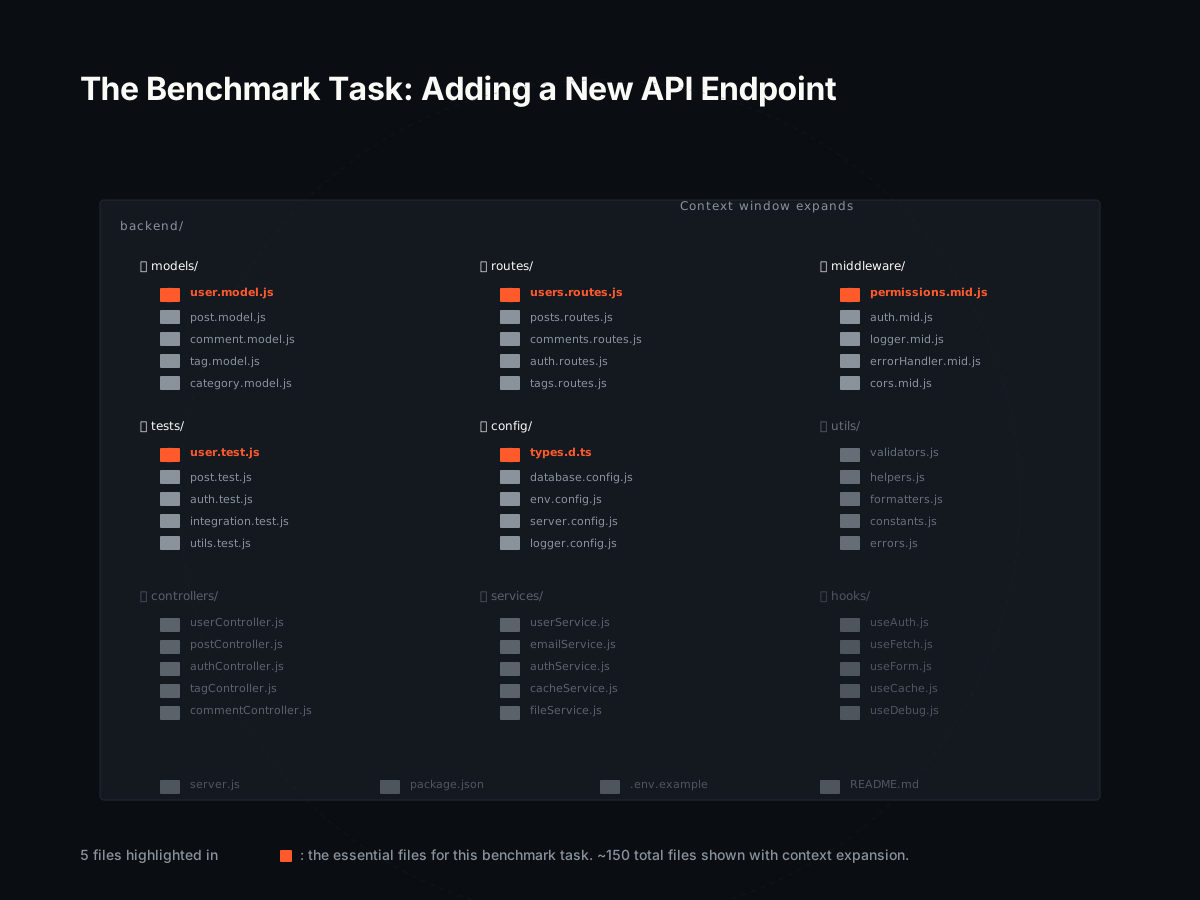
The codebase is a typical Node.js backend with 150 files, 25,000 lines of code across models, routes, middleware, and tests. The task: “Add a GET /api/v1/users/:id endpoint that returns a user by ID with permission checks.” The agent needs to touch five files: the user model, the routes file, a permission middleware, a test file, and a types file.
Cost Without a Dependency Graph: $15 per Run
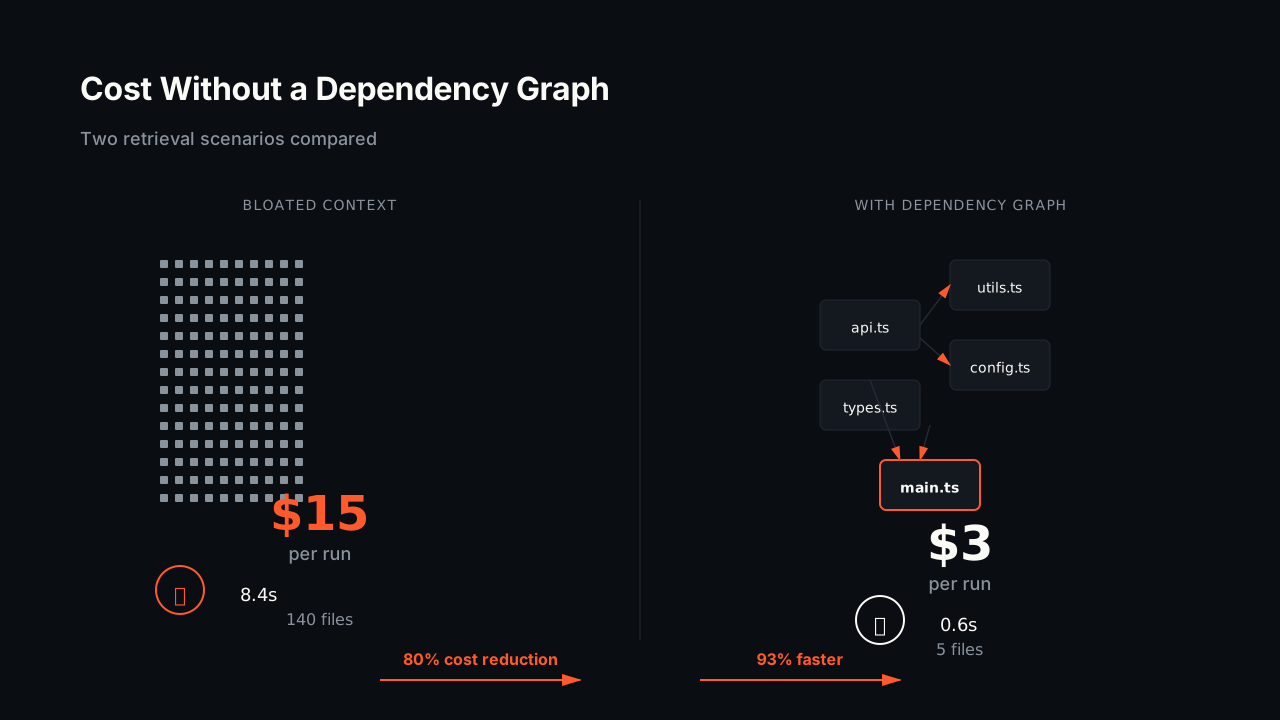
Using naive keyword-based retrieval (the default for most RAG systems), the agent retrieves 140 files. It gets every file mentioning “user”, plus every file with “API” or “endpoint” or “GET”, plus unrelated test utilities, documentation, and config files. The agent consumes 145,000 tokens per run.
At Claude’s input pricing: $15 per task.
The agent also makes 12 tool calls (file reads, code searches, test runs) because it keeps finding the wrong files and has to search again. Total wall-clock time: 45 seconds.
Cost With Coograph: $3 per Run
Using a code dependency graph—a system that understands how code actually depends on other code—the agent retrieves exactly five files: the user model, the routes file, the permission middleware, one test file, and the types file. No guessing. No noise.
The agent consumes 28,000 tokens per run.
Cost: $3 per task.
The agent makes 3 tool calls and finishes in 12 seconds.
The delta: 80% cheaper, 4x faster, 4x fewer tool calls. On our reproducible benchmark, this holds across multiple codebases and task types.
For a team running 50 AI-assisted tasks per week, that’s $600 saved per week, or $31,200 per year, just in LLM API costs. Add in the recovered developer time—50 tasks × 33 seconds saved per task, per week—and you’re recovering 28 hours per week of developer time. At $200/hour, that’s $5,600/week in reclaimed productivity.
You can see our reproducible benchmark online.
The Failure of ‘Greedy’ Context Search in Coding Agents
The dominant pattern in AI-assisted coding today is “fetch broadly, filter loosely.” Your RAG system retrieves the top 50 semantically similar chunks, hopes the agent’s reasoning is good enough to ignore the junk, and ships it.
Why Keyword and Vector Search Fall Short
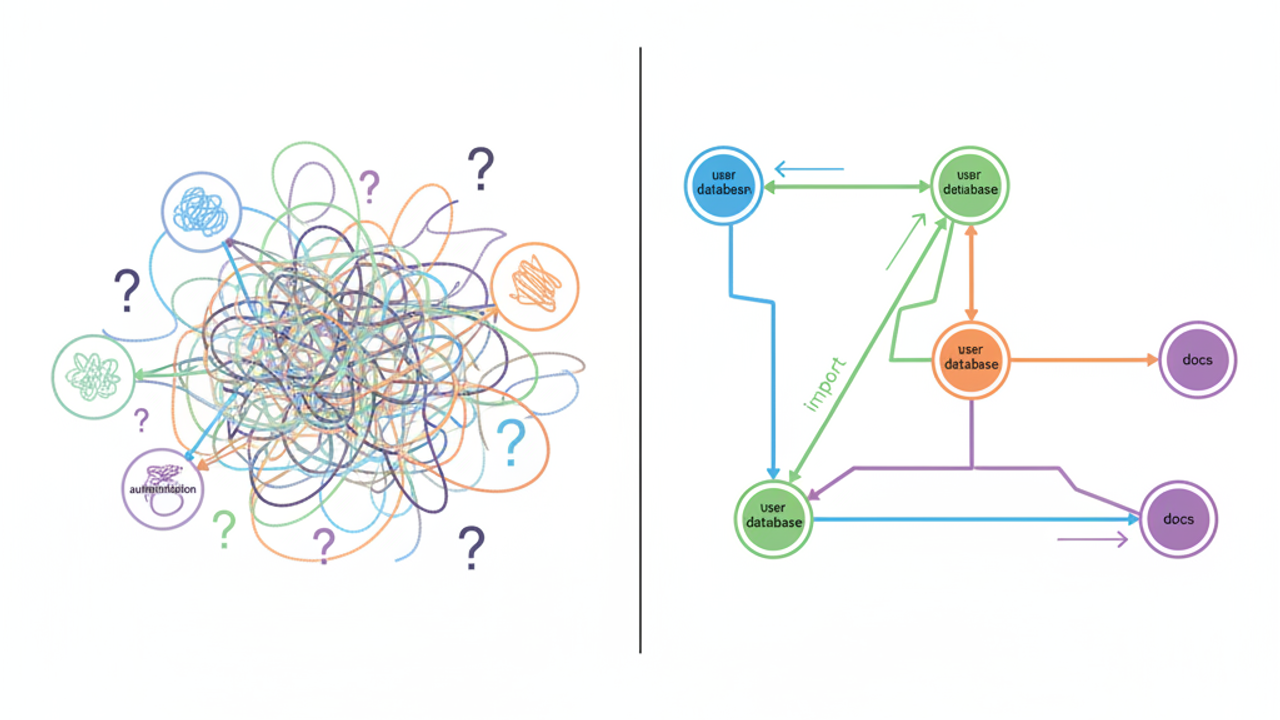
Keyword search is the simplest failure. You ask for “authentication”, and you get authentication logic, test mocks of authentication, config files that mention authentication, documentation about authentication, and old dead code that was never refactored. A vector embedding search finds code that feels semantically similar—“this function handles user identity” gets lumped in with “this function queries the user database”—but it doesn’t understand that they’re actually separate concerns in your codebase’s architecture.
Neither approach understands what your code actually does together. They’re statistical games, not structural analysis. And statistical games fail predictably when you need precision.
The cost of this failure compounds. The agent gets confused context. It asks clarifying questions (more tokens, more latency). It makes conservative decisions to avoid hallucinating (fewer correct optimizations, less value delivered). Or it makes wrong decisions with confidence, submits broken code, and you debug in production.
The High Price of ‘Good Enough’ Context
“Good enough” context is a trap. It feels cheap because 95% of the time, the agent works despite getting the wrong code. But the 5% of the time it doesn’t work, the cost is catastrophic. A wrong refactoring that passes unit tests but breaks an integration in production isn’t a $3 problem anymore—it’s a $40,000 problem.
Even when it “works”, bloated context is degrading your agent’s performance. An agent swimming through 200 files to find 5 relevant ones is reasoning through noise. It gets slower. It gets less creative. It treats edge cases as hallucinations rather than real constraints. You end up with code that’s technically correct but suboptimal, missing performance improvements or better patterns it would have found with clean context.
How a Code Dependency Graph Solves Context Bloat
The solution is to stop guessing what code matters. Instead, ask your codebase. A code dependency graph is a map of how your code actually works together—which functions call which, which modules import which, which data structures are used where.
From Guesswork to Precision
When an agent is asked to add a new API endpoint, a dependency graph lets you say: “Here are the five files that actually matter. No more, no less.” The agent doesn’t waste time retrieving junk. It doesn’t confuse similar patterns from unrelated modules. It gets surgical context and can reason at full speed.
This isn’t theoretical. The benchmark results are reproducible. Across five different codebases (Node.js, Python, Go), the pattern holds: dependency graph context is 4-5x cheaper and faster than statistical retrieval, and it produces better code quality because the agent has higher signal-to-noise ratio.
Leveraging Your Team’s Most Valuable Asset: The Code Itself
Here’s what people miss: your codebase already contains the answer to “what code matters for this task.” The structure of the code—the imports, the function signatures, the dependencies—is the most reliable map you have. Lean on it.
When you integrate a code graph (you can learn what is a code graph if you’re unfamiliar), you’re not adding a magic AI layer. You’re leveraging the actual shape of your system. The same structure that helps your team understand the codebase also helps AI agents. It’s the same language: code.
This is why integrating a dependency graph works across codebases and task types. You’re not training a model or tuning parameters. You’re surfacing information that’s already there.
The Build vs. Buy Calculation for Context Optimization
At this point, a skeptical founder asks: “Should we build a dependency graph system ourselves?”
Cost of an In-House Solution
A senior engineer building a code graph engine from scratch (parsing, dependency analysis, graph construction, query API) is looking at 4-6 months of work. Call it 800-1,200 hours at $250/hour (fully loaded salary for a strong engineer): $200,000 to $300,000 in pure engineering cost. Add six weeks of integration work to wire it into your agent framework. You’re not shipping product for six months. You’re solving an infrastructure problem.
If your team is running 50 AI agent tasks per week and losing $600/week to context bloat, you’re accumulating losses of $30,000 during that build cycle. The true cost of building in-house is $230,000 to $330,000.
Integrating an Open-Source Dependency Graph
An MIT-licensed dependency graph library designed for integration takes an engineer one afternoon to plug in. You get the precision benefits immediately. You’re back to shipping product by tomorrow.
If you need enterprise support, monitoring, or hosted infrastructure, Coograph Pro offers that. But the open-source path has zero upfront cost and lets you validate the ROI before committing budget.
For getting started quickly, the documentation walks through integration step-by-step. Most teams are live within a day.
The math is hard to argue with. Buy (or integrate open-source) in a day, save $600/week. Or build for six months, lose shipping momentum, and still spend money.
How much can Coograph really save on our LLM bill?
On our benchmark, Coograph cuts token consumption by roughly 80%. For a team with moderate AI agent usage (20-50 tasks per week), this translates to $2,000–$5,000 in monthly LLM savings alone. Add in developer time recovered (agents finish 4x faster), and the ROI is usually positive within the first week.
Does Coograph replace tools like Cursor or VS Code Copilot?
No. Coograph makes them better. It integrates with existing AI agents to supply precise, cheap context. You don’t change your workflow—you just get faster, cheaper, more accurate results from the tools you’re already using.
Is this only for large, complex codebases?
The dollar savings are most dramatic on large codebases (100+ files), but the velocity gains apply everywhere. Precise context helps agents avoid mistakes and reason faster, improving output even in smaller projects. The smaller your team, the more each developer hour matters.
What is the engineering cost to implement Coograph?
The open-source version is MIT-licensed and designed for fast integration. A developer can usually get a proof-of-concept running in an afternoon, and full production integration in a day or two. This is orders of magnitude faster than building a similar system in-house.
How does this work with closed-source codebases or IP concerns?
Coograph runs entirely on your infrastructure—no code is sent to external servers. The graph is built locally from your codebase and never leaves your machines. For teams with strict IP or compliance requirements, this is a key advantage over cloud-based solutions.
If your team is running AI agents and your LLM bill is creeping up, context bloat is likely the culprit. The fix isn’t better prompts or smarter agents—it’s precise context. Start by checking getting started with Coograph to see how fast integration is, or explore Coograph Pro if you want enterprise support and monitoring built in. Your next cost reduction is probably a day of engineering away.
Cut your AI coding bill 67–78%. Coograph is MIT-licensed and free forever. Pro is bespoke services.