MCP Server: Scaling AI Coding Agents Without The Waste
An MCP server standardizes how AI agents read your codebase. On a representative task, graph-based context cut tokens ~80% and tool calls ~4x — here's why that matters and how to think about build vs. buy.
Your team is running AI agents on ad-hoc scripts. One engineer uses Claude with a custom context loader. Another uses Aider with raw file trees. A third built an in-house tool last quarter that no one maintains. The agents fetch context inconsistently, token bills are hard to predict, and you have no single record of what code they touched. This is how a lot of teams operate today—and most of the cost is invisible until you look.
An MCP server changes the picture. It’s a standardized pipeline between your AI agents and your codebase. Instead of each agent reinventing how to understand your code, they all speak the same protocol, receive context the same way, and route through one place you can measure and audit.
What is an MCP Server and Why Does Your Team Need One?
Standardizing Agent-to-Codebase Communication
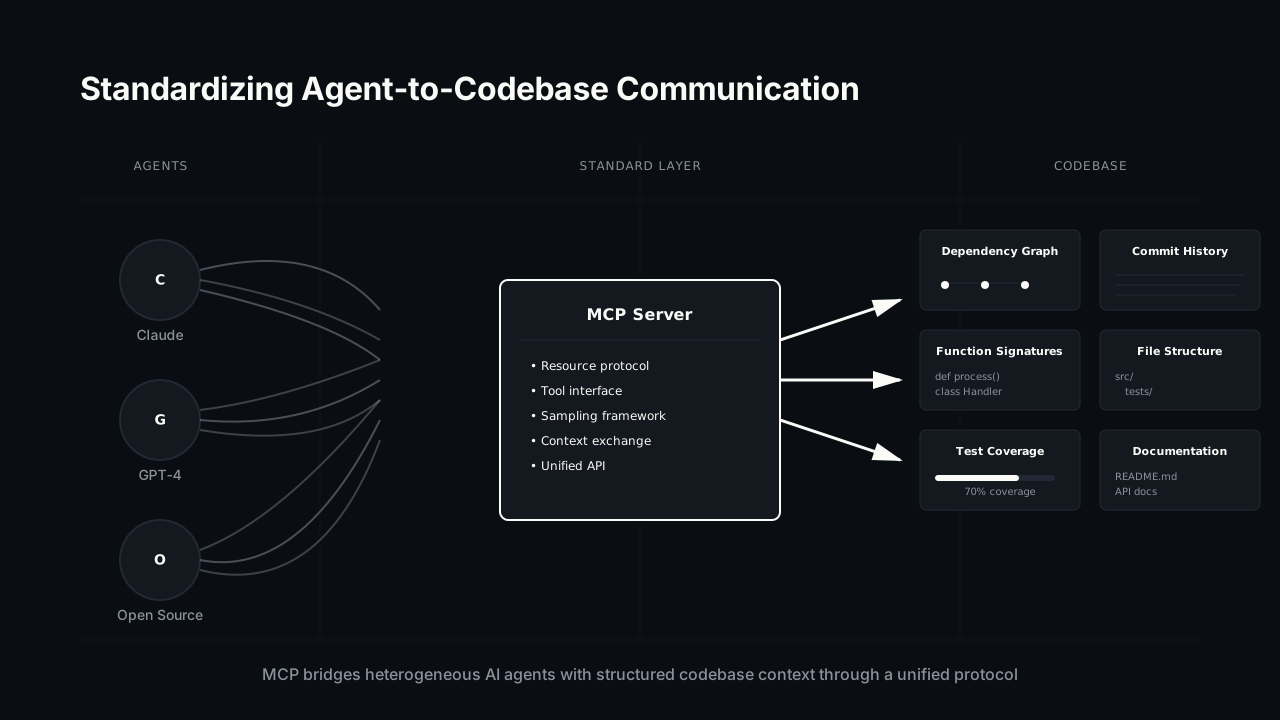
An MCP server is a universal translator. When a coding agent needs to read a function, understand dependencies, or propose a change, it doesn’t make a blind call against your repo. It talks to your MCP server, which returns exactly what the agent needs: the function, its call graph, related tests, and relevant prior commits.
Without this standardization, each agent and tool invents its own way to fetch code. One sends a few KB of context, another sends ten times that. One can’t find dependencies. Another reads stale files. The agents burn tokens on confusion, propose wrong changes, and developers spend time debugging why the AI did something unexpected.
The MCP server becomes your central interface for AI-driven code work. Every agent uses it. Every request flows through it. You can measure, audit, and optimize from one place.
Moving Beyond Ad-Hoc Scripts and Workflows
Most teams today run AI code tasks through throw-away scripts: a Python snippet that parses Git, a shell command that pipes files to an agent, a notebook someone wrote six months ago. When that person leaves, the script breaks. When you hire new engineers, they don’t know about it. The setup is different for each use case.
A standardized MCP server replaces this with a single, reliable interface. New team members onboard against one tool instead of a folklore of scripts. When you want to change how context is delivered—say, switching from full file trees to a dependency graph—you change it once, and every agent benefits immediately.
A common failure mode: two homegrown scripts use different Git-ignore rules, so one agent keeps reading files another never sees. That class of “why did it touch that file” bug largely disappears when every agent reads through the same interface.
A Single Place for Security and Auditing
When agents are scattered across ad-hoc tools, there’s no single place to enforce policy or see what happened. One script reads from a .env file, another touches a schema, and there’s no shared log tying it together.
An MCP server gives you one chokepoint to add that control. Because every read and write flows through it, it’s the natural place to log agent activity, attach access rules, and build approval steps over time. You don’t get a compliance program for free—but you get the one architectural seam where logging and policy can actually be added, instead of bolting it onto five different scripts.
The Hidden Costs of Unmanaged AI Agent Usage
Where the Wasted Spend Comes From
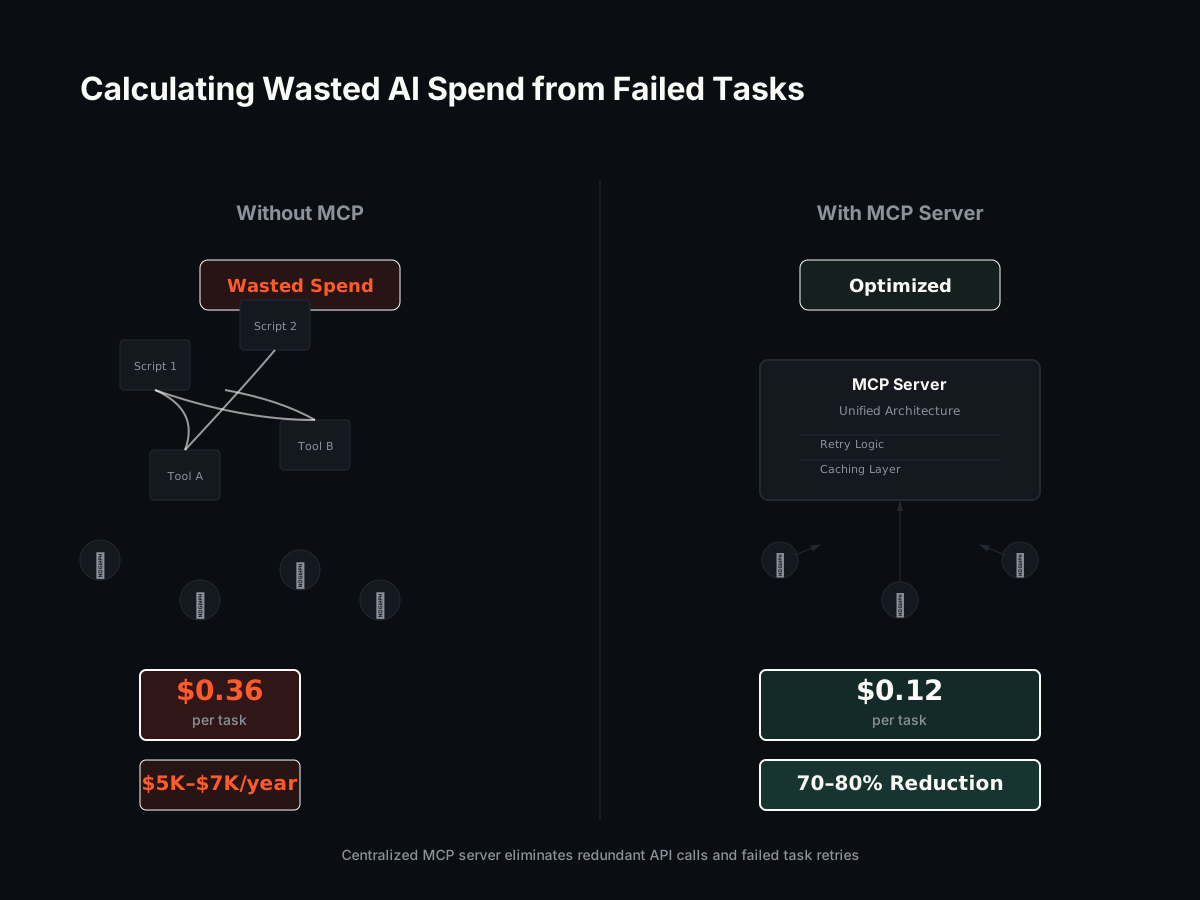
Token waste in AI coding has a clear mechanism: when an agent gets a bloated, unstructured context window—raw file trees, no dependency information, no semantic relationships—it spends more tokens to do the same job and is more likely to need a second attempt.
Here’s an illustrative example with round numbers. Suppose an agent task costs about $0.12 with tight context. Feed it 3–4x the context to reach the same answer and that single task drifts toward $0.36–$0.48. Run a few hundred of those a month and the difference is real money—not because the price per token changed, but because you paid for tokens the agent didn’t need. The exact figure depends on your model, your volume, and how clean your context already is; the point is the direction, and that it’s measurable.
An MCP server attacks this directly by delivering precise dependency-graph context instead of raw file dumps. Our own benchmark (below) shows the size of that effect on a concrete task.
Developer Hours Lost to Inconsistent Tooling
Debugging unpredictable agents also burns engineering time. An agent touches the wrong files; someone spends 30 minutes figuring out why. A task fails midway; someone re-runs it. Individually small, these add up.
A quick illustration: if inconsistent agent behavior costs an engineer ~5 hours a week, at a $150/hour fully-loaded rate that’s about $750/week, or roughly $3,000/month per affected engineer. Standardizing on one context interface won’t erase all of it, but cutting the “wrong files / stale reads” class of failure removes a meaningful chunk. Plug in your own hours and rate—the structure of the cost is the same.
Consistency also means faster iteration. When the agent behaves the same way each time, engineers can build workflows and automation around it.
Security Blind Spots in a Multi-Agent Environment
Unaudited agents are hard to reason about. They read files and propose changes, and if the activity isn’t logged anywhere, you can’t reconstruct what happened. If an agent surfaces a secret or proposes a change that later breaks something, there’s no trail back to the source.
Routing agents through one MCP server is what makes that trail possible. It’s the place you’d add logging, replay, and approval workflows—centralized instead of scattered.
Build vs. Buy: The Engineering Leader’s MCP Dilemma
Engineering Overhead of a Homegrown Solution
Building an MCP server in-house means real expertise in code parsing, dependency analysis, version-control integration, and the agent protocol itself. You need at least one senior engineer to design it and ongoing time to maintain it—call it a meaningful slice of a full-time engineer, indefinitely.
That slice isn’t free. A senior engineer’s fully-loaded cost runs well into six figures a year; dedicating even a fraction of one to internal infrastructure is a standing line item, on top of the initial build. And the protocol is still evolving, so “done” keeps moving—early versions usually need a year of fixes, context-quality tuning, and API adjustments based on real use.
The Opportunity Cost of DIY Infrastructure
The bigger cost is what that engineer isn’t doing: shipping product, improving performance, paying down tech debt. Time spent debugging an internal agent-communication layer is time not spent on the thing customers pay for. For a small team, dedicating a senior engineer to plumbing is a noticeable percentage of total capacity.
Benefits of an Open, Community-Vetted Standard
An open, battle-tested MCP server—maintained transparently—removes most of that risk. You inherit fixes and improvements from other teams instead of discovering every edge case yourself, and you avoid the “we built this in-house and now no one else understands it” trap.
MCP is emerging as a common protocol for agent-to-codebase communication, with major model and tool providers building around it. Adopting the standard means your integration work isn’t a bet on one vendor’s internal format.
Coograph Pro gives you a production-ready MCP server without the engineering overhead.
How Coograph’s MCP Server Cuts Context Waste
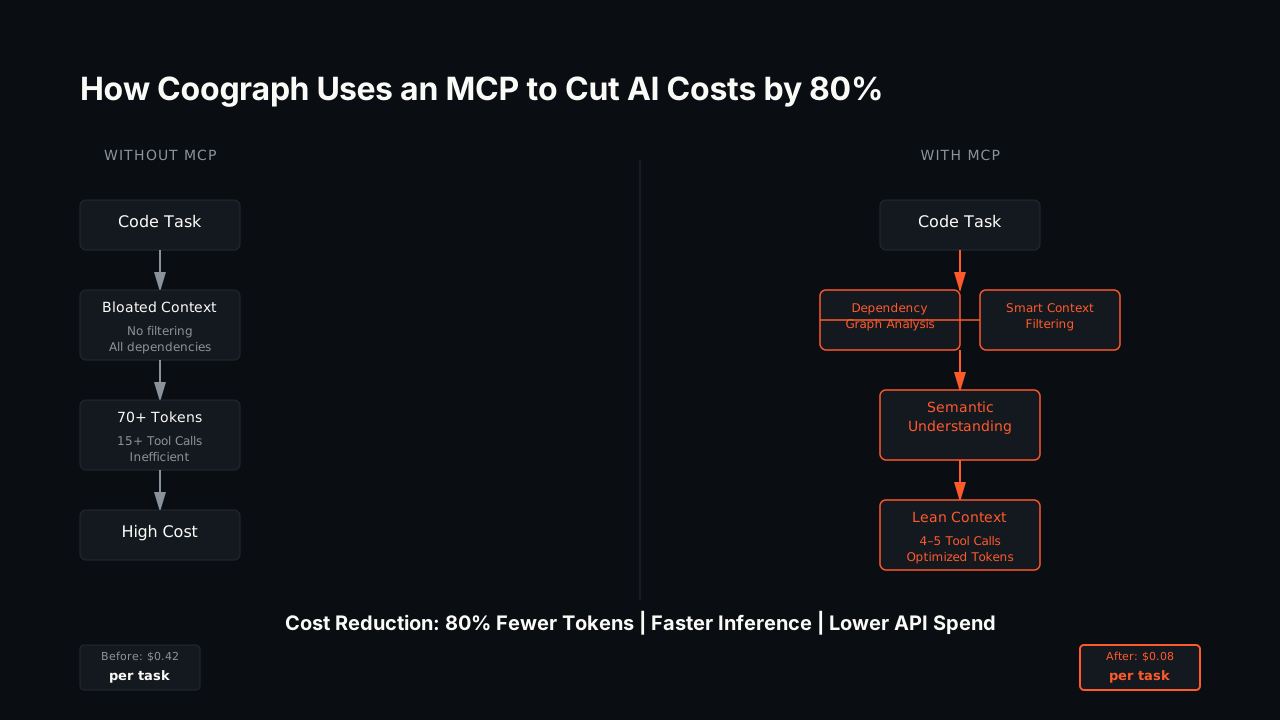
Smarter Context via Code Graph Integration
The bottleneck in most AI code workflows is context quality. The agent needs to know which files matter, how they relate, and what a safe change looks like. Raw file dumps don’t answer those questions, so the agent burns tokens on trial and error.
Coograph’s MCP server delivers precise dependency-graph context. Instead of “here are all the files in your repo,” it returns “here are the few files that matter for this task, and here’s how they connect.” The agent understands the change space sooner, makes fewer wrong turns, and finishes in fewer tokens.
A Reproducible Benchmark for Measuring ROI
This isn’t just a claim—we publish a reproducible benchmark. On the task “Add caching to OrderService.place_order()”, we compared a naive approach (grep + read every matching file) against a graph minimal-context query:
- Files read: 20 → 4
- Tool calls: 21 → 5 (about 4x fewer)
- Context tokens: ~4,760 → ~970 (about 80% fewer, 79.7% on this run)
Fewer files, fewer round-trips, fewer tokens—for the same task. These are single-task numbers on a sample fixture, not a universal guarantee, which is exactly why the benchmark is reproducible: run it against your own setup and see your own ratio before you commit.
Why Fewer Tool Calls Matters
Without structured context, agents ask the same questions repeatedly: “What imports this module?” “Where is this defined?” “Which tests cover it?” Each question is a tool call and a round-trip. A graph-aware MCP server answers many of those upfront, so the agent doesn’t have to keep asking. On the benchmark task that’s the difference between 21 calls and 5—faster execution, lower cost, and a tighter feedback loop for developers.
Integrating an MCP Server into Your Existing Workflow
Compatibility with Your Team’s Favorite Tools
Coograph’s MCP server works with tools that already speak the MCP protocol—Claude Code, Aider, and others—so you enhance existing workflows instead of replacing them. The agent your team already uses gets better context; you don’t retrain anyone.
Starting with Visibility
The first concrete win is visibility. Once agents route through one interface, you have a single place to see and log what they’re reading and proposing—rather than reconstructing it from scattered scripts. From there you can layer on controls: restrict which paths agents may modify, require review for sensitive changes, and audit modifications to critical code.
Get started with Coograph in about 15 minutes. Start with knowing what your agents are doing; cost savings follow from cleaner context.
Is an MCP server just for large enterprise teams?
No. Small teams benefit too—standardizing early prevents the tangle of one-off scripts from forming in the first place, which is cheaper than untangling it later as your AI usage and team grow.
Will this slow down my developers’ workflow?
The intent is the opposite. By delivering reliable, precise context, an MCP server reduces wrong-file and stale-read failures and the debugging they cause. Fewer surprises and rework cycles generally means faster iteration, not slower.
We already use tools like Copilot or Aider. How does this fit in?
Coograph’s MCP server sits between your developers’ tools and your codebase as a context layer. Any agent that speaks MCP can call it to receive graph-based context instead of raw file dumps. You keep your current workflow; the agents get better inputs.
What’s the security story for an MCP server?
An MCP server gives you a single chokepoint that every agent read and write flows through. That’s the architectural seam where logging, access control, and approval workflows can be added—centralized, instead of scattered across ad-hoc scripts. It’s the place to build a compliance story, not a finished one out of the box.
How do I know the savings are real for my codebase?
Don’t take ours on faith—the benchmark is reproducible. On our sample task, graph context cut tokens ~80% and tool calls ~4x, but your ratio depends on your repo and tasks. Run it against your own setup to get a number you trust before committing.
If you’re running AI agents on ad-hoc scripts today, you’re likely paying for context the agents don’t need and losing time to wrong-file debugging. An MCP server is the foundation for controlled, auditable, cost-efficient AI agent usage. Explore Coograph Pro to see how a battle-tested MCP server fits your team’s workflow, or get started with Coograph in about 15 minutes to start with visibility and cleaner context.
Cut your AI coding bill 67–78%. Coograph is MIT-licensed and free forever. Pro is bespoke services.