5 Claude Code Commands That Cut My Context-Switching in Half
The hidden Claude Code slash commands experienced terminal devs actually use daily — /statusline, !, @, /add-dir, /btw, /branch — what each saves, where /add-dir breaks at scale, and the Codex CLI gotcha that ruins muscle memory.
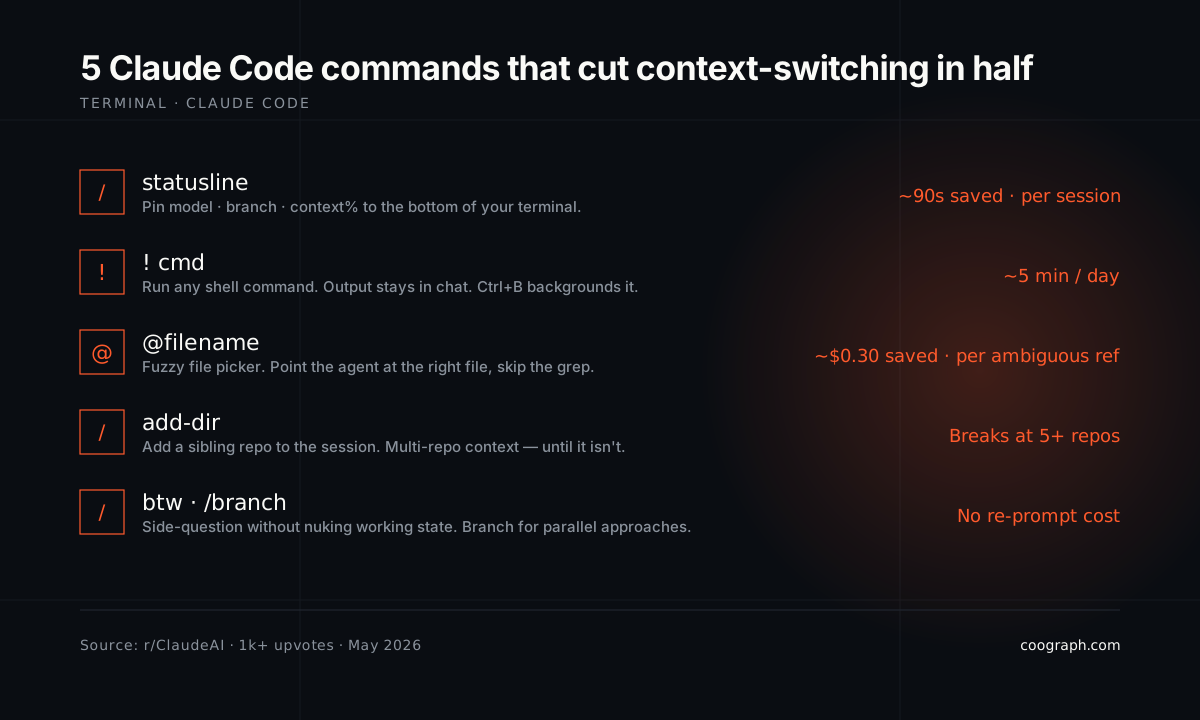
If you’ve been pasting cd /path/other-repo && claude between terminal windows, you’ve been overpaying for context. Claude Code ships with five built-in commands that experienced devs lean on daily — none of them in the onboarding tour, all of them in the docs nobody reads. The shortest of the five saves about three minutes per task. Five tasks a day. You do the math.
This post pulls the list a senior dev posted to r/ClaudeAI last week — 1,000+ upvotes for a reason — and adds the part the thread skipped: where each command stops scaling, and what to use instead. Then a Codex CLI section, because the slash semantics there will burn you if you’re context-switching between agents.
1. /statusline — Put the answer to “which model is this?” on screen
The single best ROI command in Claude Code. By default, your terminal tells you nothing about the session — which model, which branch, how much context is left, whether you’re on a Pro plan that just bumped you down to Haiku because the daily Sonnet quota burned through. You find out by typing a question, watching the reply quality, and guessing.
/statusline solves it. Run it once, Claude asks what you want shown, writes a small script that updates the bottom of your terminal in real time, done. The fields experienced devs put there:
- Model —
sonnet-4.6vshaiku-4.5vsopus-4.7. Especially critical on plans that auto-downgrade. - Branch — git branch of the cwd. Tells you when you’ve accidentally pointed Claude at the wrong repo.
- Context % — how full the context window is. The signal you need to compact or
/clearbefore the agent quietly starts dropping early instructions. - Cost-to-date — running token spend on this session.
Where it breaks: the statusline is per-machine, not per-project. If you move between laptops, you reconfigure. Save the config in your dotfiles repo so /statusline is one setup.sh line on a new box.
What it saves: roughly 90 seconds per session on the “which model am I on?” diagnostic that you’d otherwise run by typing what model are you and burning 4k tokens.
2. ! — Run shell commands without leaving the chat
Prefix a line with ! and Claude Code runs it as a shell command. Output stays in the conversation, so the agent’s next reply can reference it without you pasting anything.
> ! npm test
... (real test output appears in chat)
> What's broken in the auth test?
The agent now sees the actual failure, not your transcription of it. No copy/paste. No “let me check the output again.”
Two power-user moves:
Ctrl+Bwhile a!command is running sends it to the background. Spin up a long-runningnpm run e2eand keep iterating in the same session.- Combine with
@(next tip) for git diff workflows:! git diff @src/orders/order_service.py— the diff lands in chat, the agent reasons about it, you accept its fix in the same turn.
Where it breaks: the agent reads the full stdout into context. A 50k-line npm install will chew through your context window. Use ! npm install 2>&1 | tail -20 or pipe to a file and @ the file.
What it saves: depends on workflow, but the median dev runs ~30 quick shell checks per agent session. At ~10 seconds of copy/paste each, that’s five minutes. Compounded.
3. @filename — Type fewer characters, point at exact files
Type @ followed by part of a filename. Claude Code shows a fuzzy-matched path picker. Tab to autocomplete. The file gets injected into context directly — no agent search, no grep call, no token waste on file discovery.
The big win isn’t speed; it’s precision. When you type @order_service, the agent gets exactly that file. When you ask “look at the order service,” the agent searches your repo, often grepping for everything containing the word “order” and reading 8 files to be sure. One of those is the file you actually meant. The other seven cost you tokens.
For the cost-math obsessed: a single ambiguous file reference can cost ~$0.30 in unnecessary reads on a medium-sized repo. @ is free.
Where it breaks: doesn’t work across repos. If your auth code lives in ~/work/auth-svc/ and you’re sitting in ~/work/api/, @auth_service.py won’t autocomplete it. Which brings us to the next one.
4. /add-dir — When your project is actually three projects
/add-dir <path> tacks another directory onto the current session’s working context. Now @ autocomplete works across both directories. Useful when your “project” is a frontend repo, a backend repo, and a shared types repo — the standard shape for any company past ten engineers.
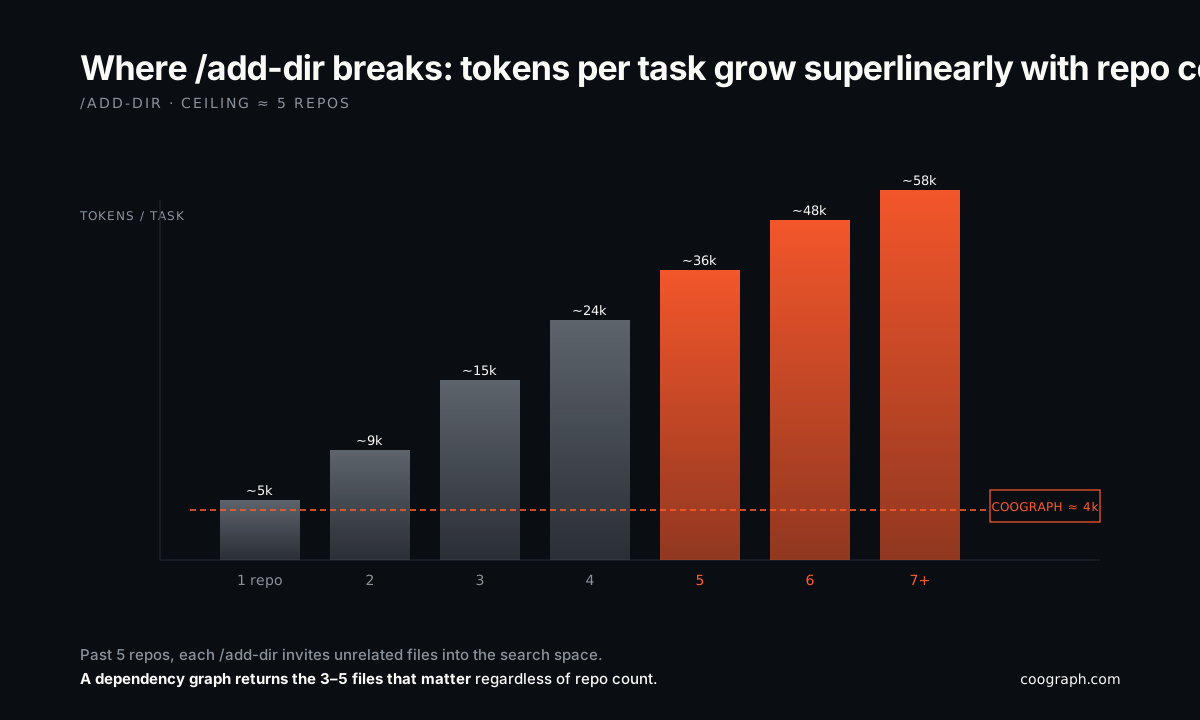
The Marmelab thread calls this “perfect for projects split across multiple repos.” It’s perfect at three repos. It starts to crack at five.
Where /add-dir breaks at scale:
- Every added directory inflates the file tree Claude has to consider. With three repos, search is still tight. At seven, the agent starts hitting irrelevant files — your
infra/,tools/, deprecated services. Token costs climb. Latency climbs. Hallucination risk climbs. /add-diris per-session. You re-add the same directories every conversation. Painful enough that most devs just stop, paste files manually, and lose the multi-repo view entirely.- There’s no semantic awareness.
/add-dirmakes the files reachable; it doesn’t tell the agent which files are actually depended on. The agent still greps. Files come back. Most are noise.
The fix isn’t more /add-dir. It’s a dependency graph the agent queries instead of enumerating files. That’s what we build at Coograph — clone the relevant repos as siblings, run /coograph-init, and the agent’s get_minimal_context() call returns the 3–5 files that actually matter for a task, including across repo boundaries. No /add-dir reconfiguration each session. No file-tree bloat. Measured 80% token reduction on the committed benchmark.
If you’re at three repos, /add-dir is fine. At seven, you want a graph.
5. /btw and /branch — Side conversations without losing your place
Two commands, one workflow problem: you’re deep in a refactor and you want to ask Claude something tangential — “hey, what’s the idiomatic Python for this pattern?” — without nuking the agent’s working state.
/btw <question>— Claude answers the side question, then returns to the prior task. Use for one-off lookups./branch— spins off a new session that inherits the current context but lets you diverge. Use for longer “wait, let me explore this approach for a minute” detours.
The hidden value of /branch: you can compare two implementation approaches in parallel without losing the original conversation. Spawn a branch, ask Claude to implement approach B, A/B the outputs side-by-side, kill the branch, return to the original session with the winner.
Where it breaks: /branch sessions don’t share file changes. If you let the branch edit src/orders/order_service.py and then come back to the main session, the main session is unaware. Easy to lose work this way. Treat /branch as read-only or commit before branching.
Bonus: the Codex CLI gotcha
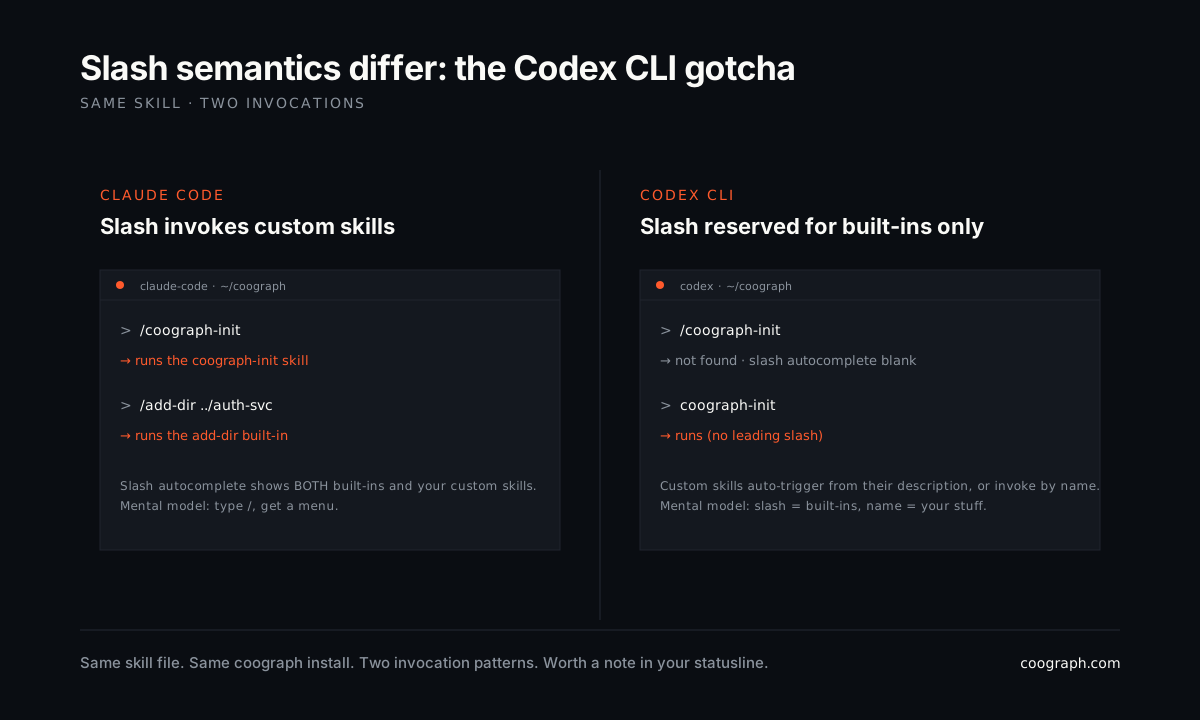
If you switch between Claude Code and OpenAI’s Codex CLI, here’s the rake that will hit you on day one.
In Claude Code, /foo runs the foo slash command — including your custom ones. In Codex CLI, / is reserved for built-in commands. Custom skills can’t be invoked with a leading slash. You either invoke them by name (coograph-init instead of /coograph-init), or you let them auto-trigger via their description (Codex’s preferred pattern).
This trips up every Coograph user the first time they try it in Codex CLI. The skill is installed, the file is there, slash autocomplete shows nothing, and you assume it’s broken. It’s not — type coograph-init without the slash and it runs.
Same skills, two different invocation patterns. Worth a 30-second mental note in your statusline.
What experienced devs actually do with these
Pulling the patterns together:
/statuslineis set once at install. Forget about it.!becomes the default way to run anything. Stop alt-tabbing.@is your verb for “look at this file” — not a search query, an explicit pointer./add-diris fine up to ~3 repos. Past that, add a dependency graph and stop fighting the file tree./btwfor one-line tangents./branchfor parallel experiments, but commit first.- Codex CLI: drop the slash on custom skills.
None of these are exotic. The Marmelab post hit 1k upvotes because the comment thread was full of devs going “wait, that’s a command?” The reason this stuff stays hidden is that Claude Code ships with a quiet onboarding — you can be productive without ever discovering /statusline, so most devs never do.
The compounding pattern: every command above saves friction per task. Friction is the one cost that’s invisible until you fix it. Five tasks a day, 250 working days a year — even at 30 seconds saved per task, that’s 10 hours. The terminal devs are not better engineers. They just read the docs.
Want fewer commands?
The honest sales pitch for Coograph: most of the workflow above is plumbing for “make Claude Code see the right files.” /add-dir, @, half of ! — they exist because the agent doesn’t have a structural view of your code. A dependency graph removes the plumbing. The agent calls get_minimal_context() once and gets the relevant files including cross-repo. No /add-dir per session. No @ fishing through autocomplete for the right path.
Coograph is MIT-licensed and free forever. Five-minute install. If you’ve ever typed /add-dir more than twice in one day, you’ll feel the difference within the first task.
Getting started · Benchmark · GitHub
How is this different from just memorizing more slash commands?
The slash commands give you better friction. A dependency graph removes the friction altogether. If your day-one experience with Claude Code is @src/orders/... to point it at the right file, day-100 should be the agent already knowing which file matters. That’s what get_minimal_context() returns — and what /add-dir can’t, because it adds files to the search space rather than narrowing it.
Why doesn’t Codex CLI just support the same slash syntax?
Codex CLI reserves the / namespace for OpenAI’s built-in commands. Custom skills register their name and a description; the model auto-invokes them when the description matches the user’s intent. It’s a different design choice — less explicit, more declarative — and you live with it. The practical workaround is to use clear, unambiguous skill descriptions so auto-trigger fires reliably, and to type coograph-init (no slash) when you need to invoke explicitly.
Does /branch cost extra?
Each /branch is a new session, so yes — it incurs its own context window load. If the main session is already 60% full, branching duplicates a lot of those tokens into the new session. Cheap for quick experiments, expensive for long parallel runs. Read the context-% from your /statusline before branching on a heavy session.
Cut your AI coding bill 67–78%. Coograph is MIT-licensed and free forever. Pro is bespoke services.