You're Not Over Budget. You're Over Quota.
Claude Code's weekly cap and Copilot's new per-credit meter punish the same thing: agents that read 20 files when 4 would do. The fix isn't a bigger plan—it's a smaller context.
It’s Wednesday and your team already hit the wall. Claude Code’s weekly cap is spent, the Max seats are throttled, and nobody shipped the thing you actually planned for Thursday and Friday. You didn’t overspend. You ran out of quota.
This is the new shape of the problem. As of June 2026, the meter runs two ways. Claude Code enforces a weekly compute ceiling on top of its 5-hour rolling window—Anthropic publicly acknowledged in late March that users were hitting limits “far faster than expected.” And on June 1, GitHub Copilot switched to usage-based billing: AI Credits at one cent each, burned per token at published per-model rates. Either way, every file your agent reads is now a line item against a budget that runs out mid-week.
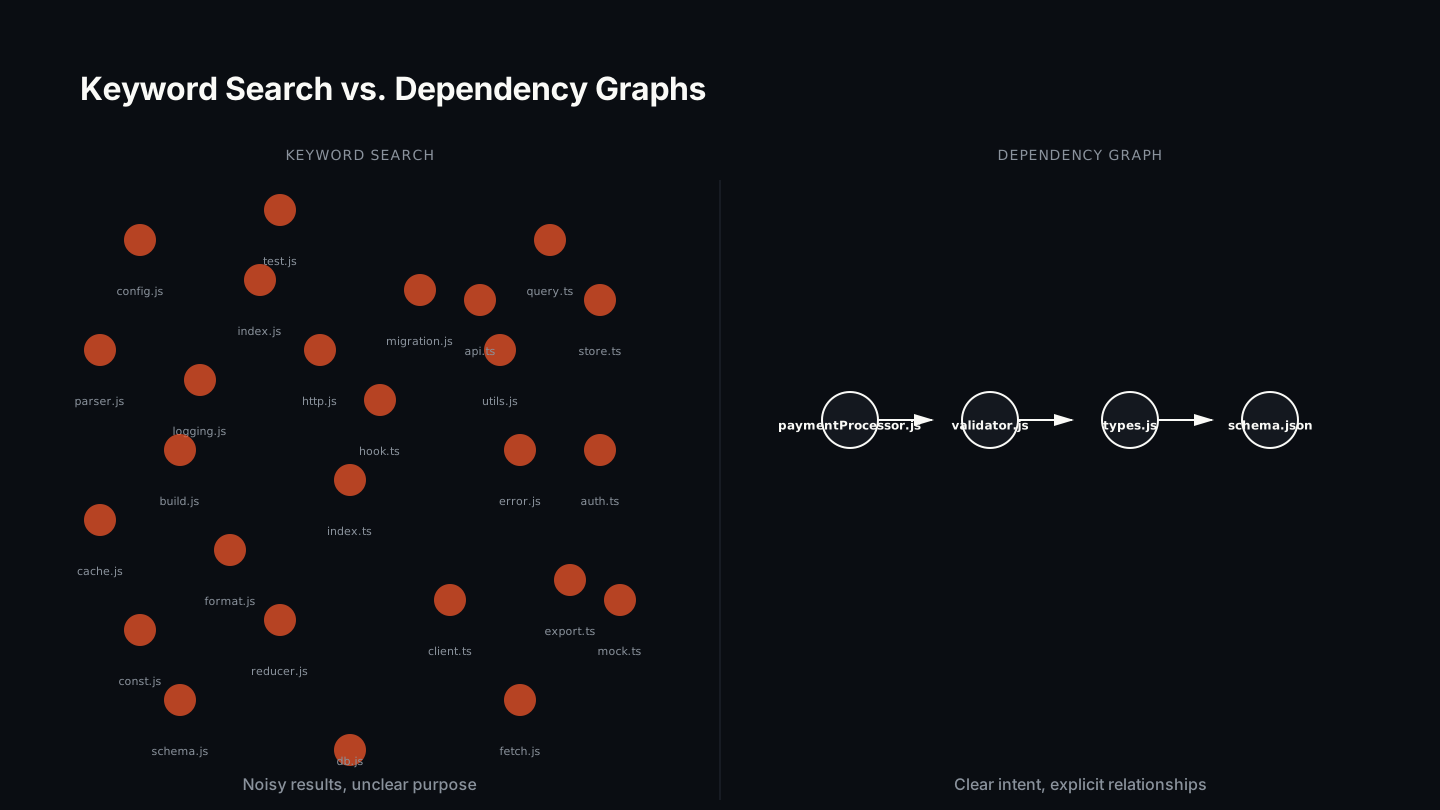
Here’s the part nobody wants to say out loud: most of those files were never needed. Your agent finds code with keyword search or vector similarity—blunt instruments that retrieve everything tangentially related to a term and drown the model in noise. A senior engineer would scan the project structure, follow the actual dependency chain, and read exactly what matters. Your agent has no way to do that yet. So it reads 20 files to change 4, and you pay—in dollars, in quota, and in the throttle that stops your team on a Wednesday.
The RAG Era Is Ending—And It’s Taking Your Quota With It
For two years the answer to “how does an agent find code?” was retrieval: embed the codebase, search for the query, stuff the top matches into context. That pattern is now visibly cracking. The industry term shifting through 2026 is context architecture—the recognition that retrieval-augmented generation over-fetches by design, and that agents need a structured context layer, not a pile of probable matches.
The reason is simple. Retrieval optimizes for recall: return anything that might be relevant. That’s the wrong objective for a coding agent, because in code the relationship that matters isn’t lexical similarity—it’s the dependency edge. OrderService.place_order() calls a repository, which uses a cache policy. Those files form the chain. No keyword finds that relationship. No embedding captures it.
Why keyword search wastes quota
Keyword search is deterministic and fast, which is why it’s everywhere. Index every word, look it up in constant time. But deterministic isn’t correct. Search for “order” in a backend and you get the order service, sure—plus every route handler that mentions orders, every test fixture, the billing service that imports an order DTO, a migration file, and comments in the audit log. Your agent receives a firehose of loosely related code and has to spend reasoning tokens deciding what’s noise.
Why vector search isn’t the fix
Vector search is smarter—it knows “verify user identity” is close to “authentication.” But it still returns probable matches, not certain ones. It still over-fetches. And building embeddings means shipping your codebase to an external service: a security boundary, a latency cost, and one more monthly bill. You traded a keyword firehose for a semantic one.
Keyword Search vs. Dependency Graphs: A Primer
What a dependency graph actually knows
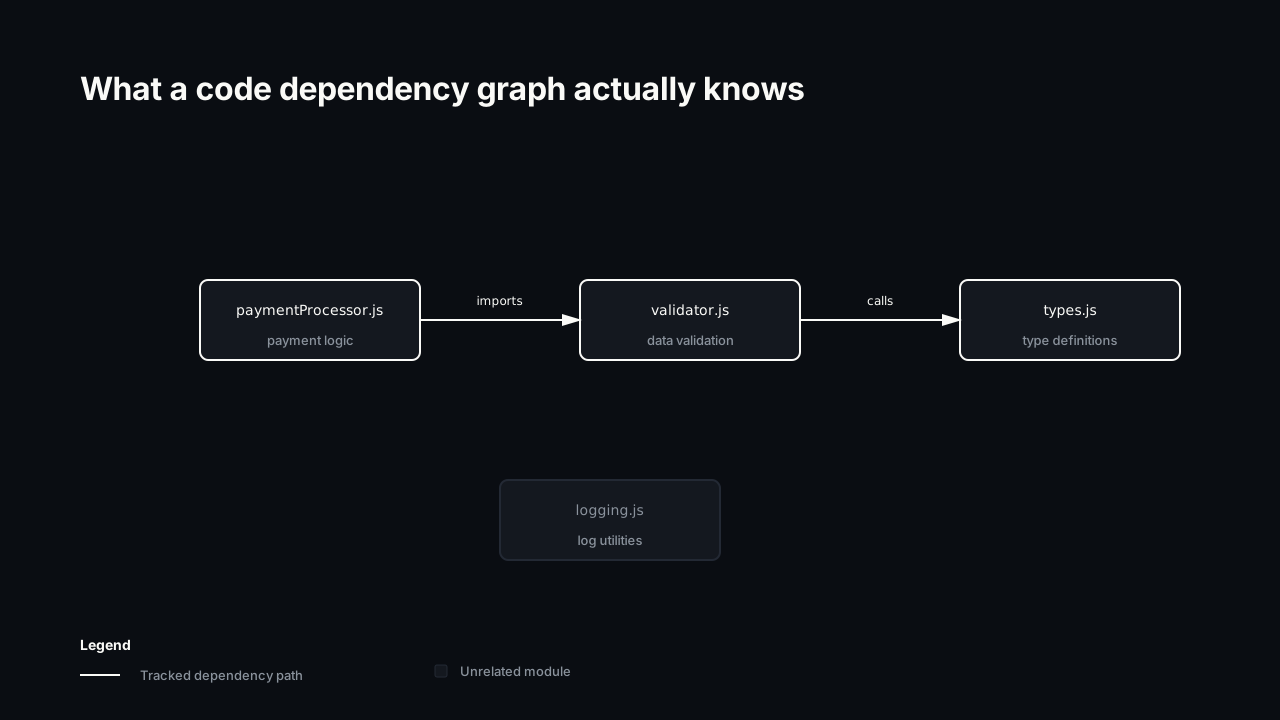
A dependency graph is a structure where nodes are functions, classes, and files, and edges are “X calls Y” or “X imports Y.” You build it once by parsing the codebase—imports, function calls, class inheritance, exports—and store the relationships in a queryable database.
Now when an agent asks “what does this change touch?” you traverse the graph from the entry point and return only reachable nodes. Start at the function, follow its calls, trace its dependencies, stop. The agent gets the chain—and only the chain—in one query. Zero guessing, zero false positives from a comment or a naming collision.
This is what context architecture means in practice for code: replace probabilistic retrieval with a deterministic graph traversal. The agent reads fewer files, holds less noise, makes fewer mistakes—and burns less of the quota that’s about to run out on Wednesday.
Quantifying the Waste: The Committed Benchmark
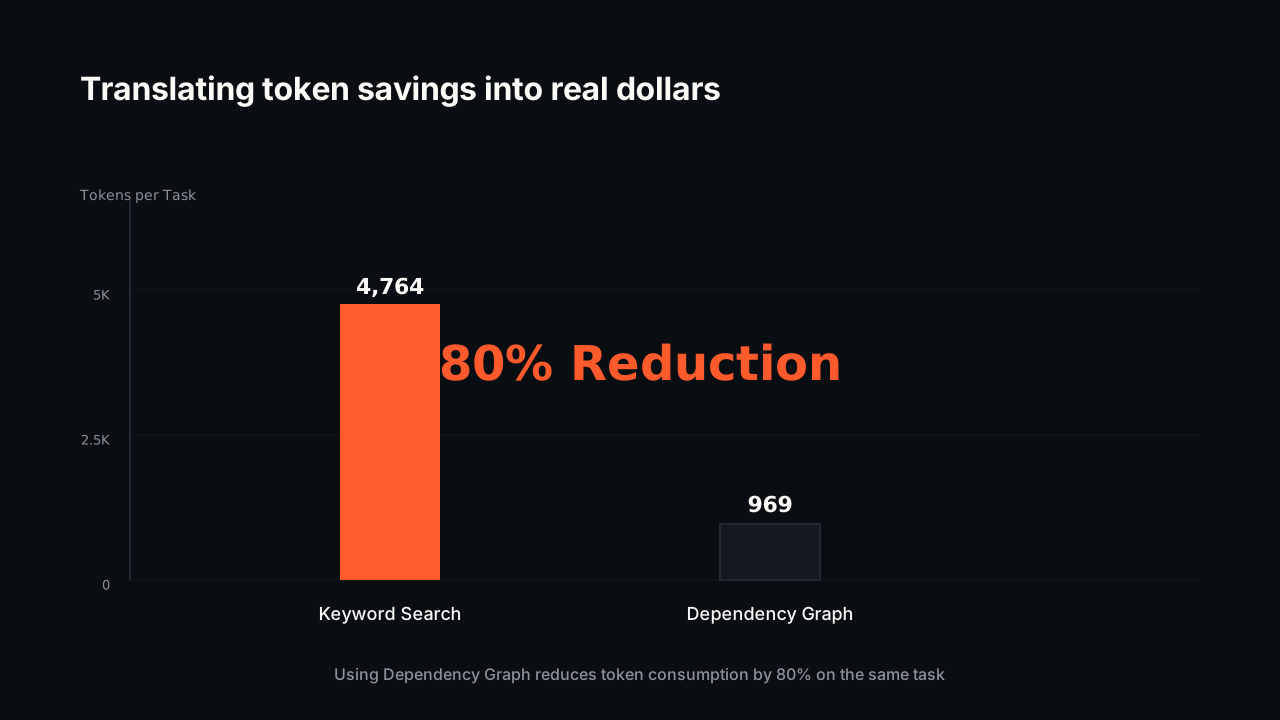
Coograph ships a benchmark in the repo so you don’t have to take the claim on faith. It’s a single fixed task—“Add caching to OrderService.place_order()”—run against a single committed fixture (bench/fixtures/sample-app/). Both are checked in. Anyone can rerun it and get the same numbers. That honesty matters more than a bigger headline: a benchmark you can’t reproduce is marketing, not measurement.
On that task:
- Naive grep + read all matching files: 20 files, ~4,764 input tokens, 21 tool calls.
- Graph minimal-context query + read returned files: 4 files, ~969 input tokens, 5 tool calls.
That’s a ~80% token reduction and a ~4× drop in tool calls—on one representative refactoring task. Real savings depend on repo size and task shape: the bigger the codebase and the more focused the change, the more the graph wins. It is one task, not a universal guarantee. But the mechanism is the same every time—read the chain, skip the firehose.
What does ~80% fewer tokens per task buy you? Two things the meter cares about. On Copilot’s per-credit billing, it’s a smaller line item on every change. On Claude Code’s weekly cap, it’s more tasks before you hit the wall—the agent does the same work for a fraction of the context, so the same quota stretches further into the week. We don’t put a number on “days of quota saved”—that depends entirely on your workload—but the direction is not subtle.
For the dollar-curious: at Sonnet 4.6’s input rate of $3 per million tokens, the difference on this one task is roughly $0.014 versus $0.003—fractions of a cent. The token bill was never the scary part. The throttle is. Fewer tokens per task is fewer tasks lost to the cap.
Fewer tool calls, faster cycles
Tokens are half the story; tool calls are the other half. When an agent lacks context it re-queries—search, read, “that’s not it,” search again. On the benchmark that’s 21 round-trips versus 5. Each round-trip is latency the developer waits through. Cut tool calls ~4× and the agent assembles its context in one pass instead of four, which is the difference between staying in flow and watching a spinner.
The Build-vs-Buy Calculus
The DIY path
Building a dependency-graph system in-house looks like a sprint and turns into a standing team. Language heterogeneity (Python, TypeScript, Go each have different import semantics). Persistence and query patterns once the graph outgrows memory. Incremental updates so the graph isn’t stale ten minutes after you build it. Parser edge cases—decorator chains, dynamic imports, conditional requires—where a 2% miss rate means your agent is wrong on 1 task in 50. A working v1 is weeks; a correct v1 is the part that never ends.
The Coograph alternative: open source, local, MIT
Coograph is an open-source parser and graph engine. It uses tree-sitter for Python, TypeScript, JavaScript, Go, Rust, Java, C#, Ruby and more, with a regex fallback so unsupported languages degrade instead of failing the build. It produces one file—.code-graph/graph.db, a SQLite database—that lives locally and never leaves your machine. No external embedding service, no third party seeing your code, no API key.
Setup is minutes. Clone Coograph as a sibling directory, run /coograph-init from your AI tool (Claude Code, Copilot, Cursor, Windsurf, Codex CLI, OpenCode, Aider, Cline), and let it build the graph—or build it directly with uv run --with-requirements .github/code-graph/requirements.txt .github/code-graph/server.py --build. A git hook re-parses only the files whose SHA changed on every commit, so the graph stays current in milliseconds. The whole repo is MIT-licensed and free forever—there are no gated features.
How Coograph Feeds Your Agent Better Context
Your agent queries the graph through MCP tools—get_minimal_context, query_graph, and friends—instead of running keyword searches. The MCP server is a typed convenience layer over the SQLite file; you can query it directly with sqlite3 if you’d rather. The documented fallback order is MCP first, then sqlite3, then grep only if the graph genuinely isn’t present.
It works with the agents you already run—it doesn’t replace your agent, it feeds it the dependency chain instead of a keyword dump. Because the graph is local, there’s zero network latency and zero data leaving your machine.
For teams that want more than the OSS core, Coograph Pro is services, not a SaaS tier: bespoke integration, custom parsers for in-house languages, and ongoing benchmarking against your real workload. Engagements typically start around a time-boxed 2–4 week first phase. There is no feature behind a paywall—everything in the repo is open source.
How much does Coograph actually save?
On the committed benchmark task (“Add caching to OrderService.place_order()” against bench/fixtures/sample-app/), Coograph cuts input tokens ~80% (4,764 → 969) and tool calls ~4× (21 → 5). It’s one fixed, reproducible task—not a universal guarantee. Your savings scale with repo size and how focused the change is.
Will this help with Claude Code’s weekly cap or Copilot’s credits?
Indirectly but directly enough to matter. Both meters charge for tokens. Reading 4 files instead of 20 means each task costs a fraction of the context, so the same weekly quota stretches across more tasks and each Copilot change is a smaller credit line item. We don’t quantify “days of quota saved”—that depends on your workload—but fewer tokens per task is unambiguously fewer tasks lost to the throttle.
Does Coograph work with the agent we already use?
Yes. It integrates with Claude Code, VS Code Copilot, Cursor, Windsurf, Codex CLI, OpenCode, Aider, and Cline via an MCP server. It’s a context layer, not a replacement—you keep your agent and give it the dependency chain instead of keyword results.
Is it hard to set up or maintain?
No. Clone Coograph as a sibling directory, run /coograph-init, and let it build the graph—or run the build command directly. The output is a single SQLite file (.code-graph/graph.db). A git hook re-parses only changed files on each commit, so there’s no server to run and no ongoing overhead.
Open source or paid?
The whole repo is MIT-licensed and free forever—no gated features. Coograph Pro is bespoke services (integration, custom parsers, benchmarking), not a locked tier of the product.
You’re not over budget. You’re over quota—and the cause is an agent reading files it never needed. Generate your first graph with the getting-started guide, see what’s inside it on the code-graph page, or talk to us about Coograph Pro if your team needs hands-on integration. The benchmark is committed. Rerun it yourself.
Cut your AI coding bill 67–78%. Coograph is MIT-licensed and free forever. Pro is bespoke services.