Agentic Coding is Here. Are You Ready for the Token Bill?
Autonomous coding agents multiply engineering output and API spend at the same time. Most of that spend is context waste, and a code graph cuts it by two thirds.
Heavy agent users are running $150 to $250 per developer per month in API costs, and a large share of that is the agent reading files it did not need. The token bill scales with autonomy, not with output. That is the part nobody put in the pitch deck.
Here is the mechanic. An agent asked to fix a bug in a payments module does not know your codebase, so it greps for “payment”, gets 40 hits, reads a dozen files at a few thousand tokens each, decides half were wrong, and reads more. You paid for every one of those reads whether or not the file mattered.
The New Wave of Agentic Coding Tools
From Autocomplete to Autonomous Agents
Two years ago the product was line completion. You typed, it guessed the rest of the line, you accepted or you did not. The cost per interaction was tiny because the context was tiny: the current file and maybe a few neighbors.
Now the product is a loop. You hand the agent a ticket, it plans, reads, edits, runs tests, and iterates until it thinks it is done. Every platform worth naming has shipped some version of this, and the direction of travel is toward longer autonomous runs with less human checkpointing.
That loop is where the money goes. A single completion costs fractions of a cent. A single multi-step agent run on a real ticket can burn hundreds of thousands of input tokens before it produces a diff.
The Promise: Leverage for Smaller Teams
The reason founders keep buying is that the leverage is real. A six-person team that ships like a ten-person team without ten salaries is a genuinely different company, and agentic tools get you part of the way there on migrations, test coverage, dependency bumps, and the long tail of small tickets nobody wants.
The trap is treating the API bill as a rounding error against headcount savings. It is not a rounding error at scale, and more importantly, most of it buys you nothing. Waste in the context window is waste in the P&L, and it grows with every engineer you add.
The Hidden Line Item: API Calls & Context Tokens
Why More Autonomy Means More API Waste
An agent without a map of your codebase does keyword search and hope. It reads broadly because reading broadly is the only strategy available when you cannot tell which files actually connect to the one you are editing.
That produces two compounding costs. The obvious one is input tokens on files that turn out to be irrelevant. The less obvious one is tool calls: each read is a round trip, each round trip is latency, and a run that takes 18 tool calls instead of 7 takes proportionally longer to hand back a result your engineer is sitting there waiting for.
There is a third cost that does not show up on the invoice at all. Stuff enough marginally related code into a context window and the agent’s output quality drops, which means more rejected diffs and more re-runs on the same ticket.
A Hypothetical Cost Breakdown
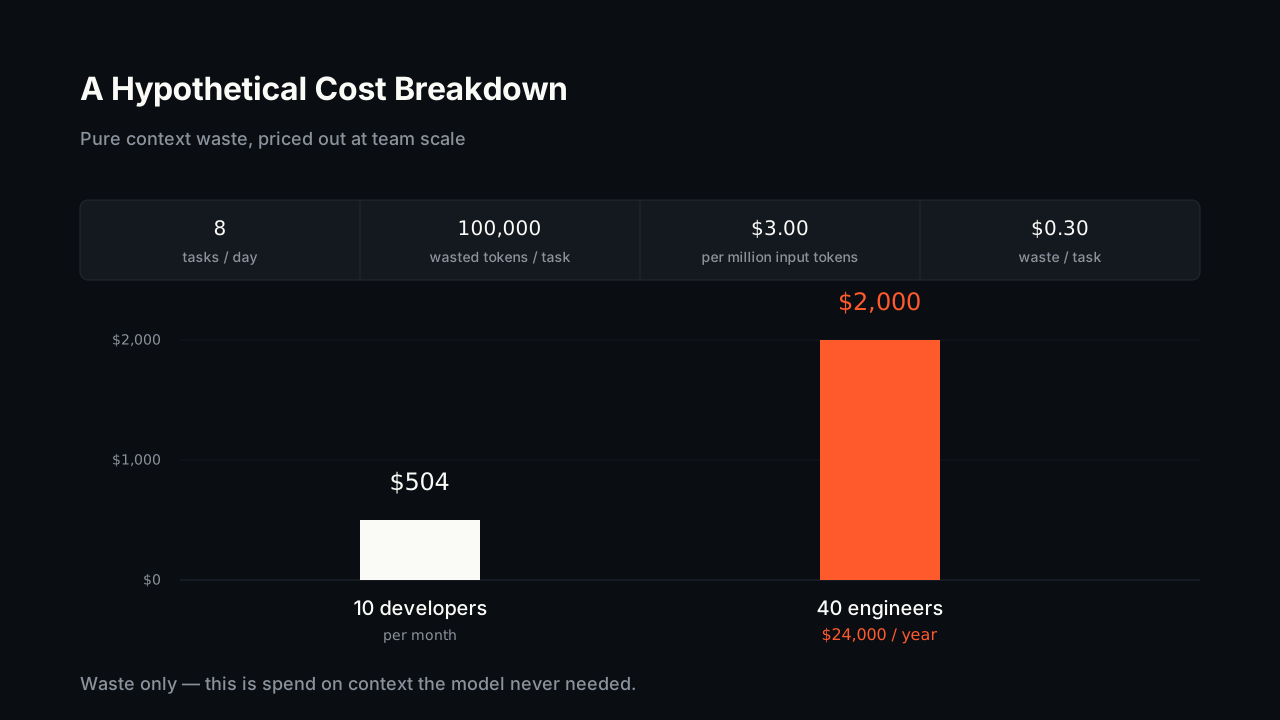
Suppose a 10-developer team where each engineer runs 8 agent tasks a day, and each task wastes 100,000 input tokens on files that turned out to be irrelevant. At $3 per million input tokens, that is $0.30 of pure waste per task.
Run the arithmetic: $0.30 x 8 tasks x 10 developers x 21 working days comes to roughly $504 per month in tokens that bought nothing. That sits on top of the useful spend, and it is a conservative version of the scenario since 100k tokens of waste is modest for an agent working a multi-file ticket.
Now scale it. The same waste rate across 40 engineers is a little over $2,000 a month, or $24,000 a year, spent reading files that had nothing to do with the ticket. That is a hire’s worth of budget going to grep-and-hope.
How a Code Graph Provides Surgical Context
From Keyword Guessing to Dependency Analysis
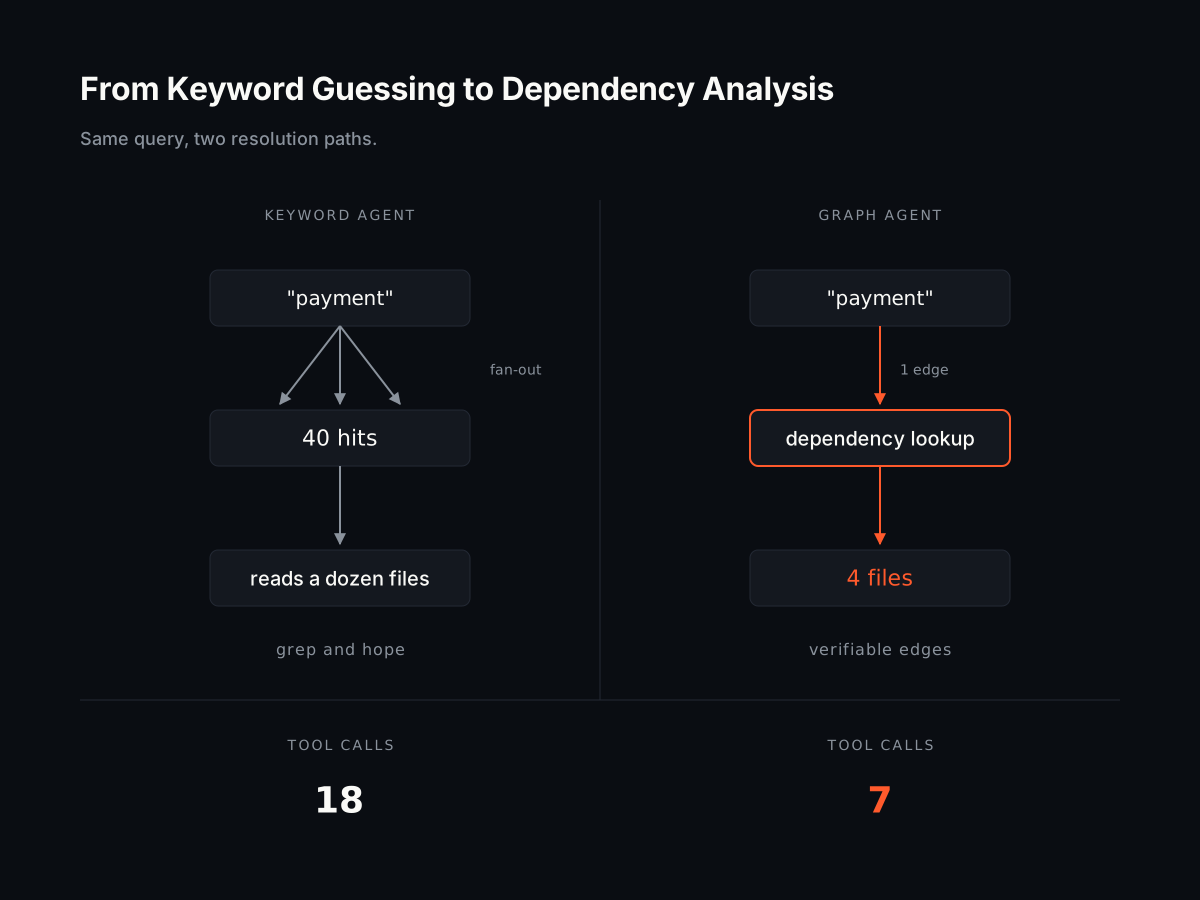
A code graph is a structural map of your repository: what imports what, what calls what, what breaks if you change this function. If you want the mechanics, we wrote up what is a code graph in the docs, but the short version is that it replaces guessing with lookup.
The difference in behavior is stark. Asked to modify a payment handler, a keyword-driven agent reads every file containing the string “payment.” A graph-driven agent asks which files actually depend on that handler and gets back four files, because four files is the real answer.
This is also the honest distinction from vector search over code. Embeddings find files that read similarly to your query, which is useful for discovery and unreliable for correctness. Dependency edges are facts you can verify, not similarity scores you have to trust.
The Benchmark: Slashing Tokens and Tool Calls
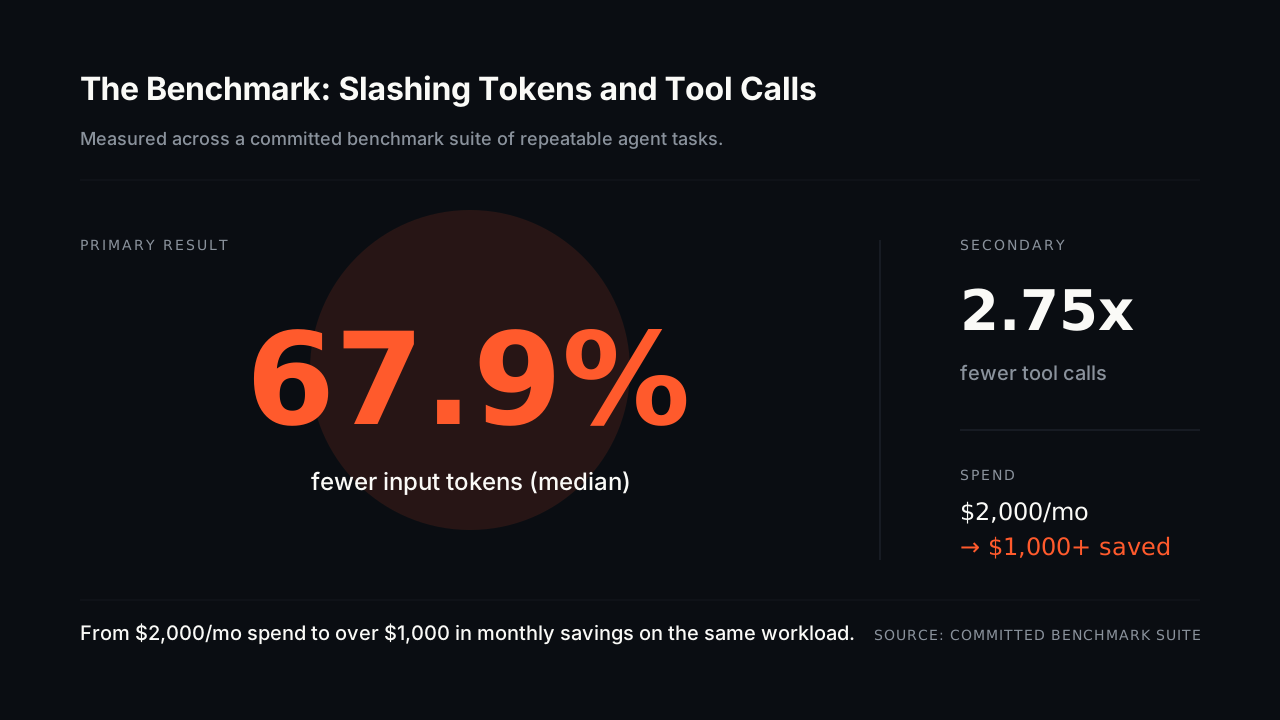
We measured this rather than asserting it. Across the committed benchmark suite, agents with graph-supplied context used a median of 67.9% fewer input tokens and made 2.75x fewer tool calls to complete the same tasks.
Apply that to the numbers above. A team spending $2,000 a month on agent API calls that cuts two thirds of its input tokens is looking at north of $1,000 in monthly savings, and the 2.75x reduction in tool calls means every task returns meaningfully sooner.
The latency effect is the one engineering leaders undervalue. An agent that finishes in 90 seconds instead of four minutes changes how engineers use it, because at four minutes they context-switch and lose the thread.
The Build vs. Buy Decision for Code Intelligence
The Engineering Cost of a DIY Solution
You could build this. Plenty of teams have started: parse the repo, extract imports and call edges, store them, keep them fresh as the code changes.
Then you meet the second half of the project. You need a parser per language, incremental updates that keep pace with commits, resolution logic for dynamic imports and monorepo aliases, and a query layer your agents can actually use. Compiler-adjacent work is a specialty, and hiring for it means competing for the same people who could be building your product.
The maintenance tail is worse than the build. Every framework convention, every new language your team adopts, every refactor of your build system is another edge case in a system that only pays off when it is complete and current. This is infrastructure, not differentiation, and infrastructure is the category you buy.
Integrating an Open-Source Graph Instantly
Coograph is MIT-licensed and open source, which removes the usual objection to buying infrastructure: you are not betting your context layer on a vendor’s roadmap or pricing whims. Read the source, fork it, run it in CI.
It plugs into the agents your team already pays for rather than replacing them. Your engineers keep their tools and their habits; the agents just stop reading files that do not matter. For teams that want managed indexing, hosted graphs, and support across larger repos, Coograph Pro handles the operational side, and getting started with Coograph takes an afternoon on a single repo if you want to measure the difference yourself before committing.
Run it on one service, compare token counts on ten real tickets, and decide from your own numbers.
How is a code graph different from vector search (RAG) for code?
Vector search finds files that are semantically similar to a query, which is a probabilistic guess. A code graph finds files with actual, verifiable dependencies such as function calls and imports. The result is more precise retrieval and far less irrelevant context in the window.
How much can our team actually save?
Our benchmark shows a median 67.9% reduction in input tokens. A team spending $2,000 a month on agent API calls could see over $1,000 in monthly savings, plus 2.75x fewer tool calls, which shortens the wall-clock time on every task.
Does this replace GitHub Copilot or Claude Code?
No. Coograph is an efficiency layer that plugs into the agents you already run, feeding them precise context so they cost less and finish sooner. It supports most popular tools, and your engineers do not change how they work.
Is it difficult to set up?
No. It generates a SQLite database of your codebase’s dependency graph that your agents query for context. The docs walk through a single-repo setup, and you can benchmark it against your current spend before rolling it out.
Cut your AI coding bill 67–78%. Coograph is MIT-licensed and free forever. Pro is bespoke services.