AI Agents Cause Outages? Fix the Input, Not Just the Model
Engineers report ~17 hours a week debugging AI-generated code while median productivity gains sit near 7.7%. The bottleneck is context retrieval, not model quality.
The median productivity gain from AI coding tools in controlled studies lands around 7.7%, not 10x. Meanwhile, survey data puts the time engineers spend debugging AI-generated code at roughly 17 hours per week. Those two numbers together describe a tool that writes faster than your team can verify.
Think about what 17 hours means on a calendar. That is more than two full working days per engineer, every week, spent reading code nobody on the team wrote, looking for the one line where the model confidently invented a function signature that does not exist. The code compiles. It passes the happy path. It fails at 2am when a nullable field shows up in production.
The Agentic Promise vs. The Productivity Paradox
Why 10x hype meets a 7.7% reality
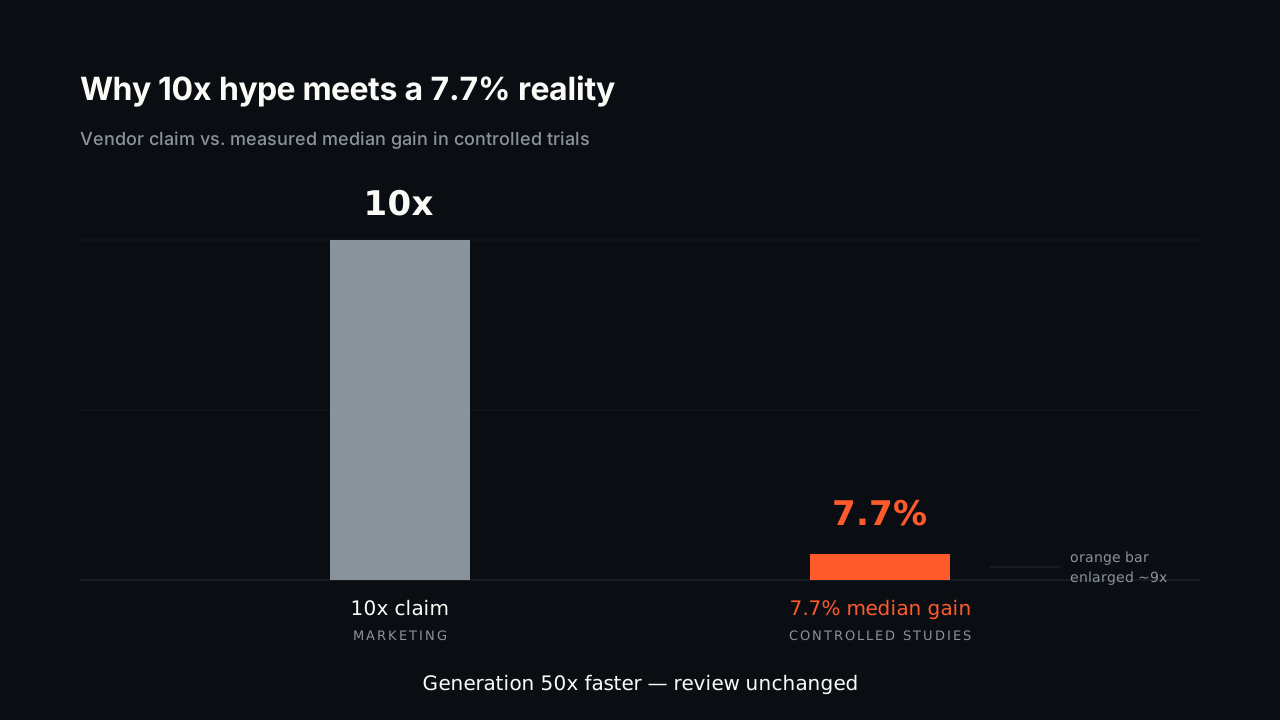
Model quality is not the constraint anymore. Frontier models from OpenAI and Anthropic write competent code for well-specified tasks, and they do it in seconds. The constraint is that generation got 50x faster while review stayed exactly as slow as a human reading a diff.
So output volume went up and throughput barely moved. Your team ships more pull requests and spends more hours reviewing them. That is the shape of a 7.7% median gain sitting underneath a 10x marketing claim.
The hidden cost: The 17-hour debug week
The debugging cost is worse than normal debugging because the author is not in the room. When an engineer writes a bug, they carry a mental model of why they wrote it that way. When a model writes a bug, the reviewer starts from zero.
The failures are also a specific kind: plausible-looking code that references the wrong service, the deprecated client, or an internal helper that was deleted six months ago. These do not surface in a quick skim. They surface in staging, or they surface in an incident channel.
Garbage In, Garbage Out: The Root Cause is Context Bloat
When “project-wide context” means “project-wide cost”
Most agents find relevant files by grepping. They search for a symbol name, get back 40 matches across tests, mocks, generated code, and vendored dependencies, and shovel whatever fits into the prompt. There is no structural understanding of which of those 40 files actually matters for the change.
That is why “project-wide context” has become a billing problem. A keyword match on createUser in a mature repo might pull 30,000 tokens of noise to find the 2,000 tokens that mattered. You pay for all of it, every turn, on every agent in your org.
How naive context retrieval confuses agents
Irrelevant context is not neutral. If a prompt contains both the current auth module and a deprecated copy that still lives under /legacy, the model has no reliable signal about which one is live. It picks one, writes confident code against it, and the reviewer has to catch it.
This is where hallucinations actually come from in day-to-day engineering work. The model is not fabricating from nothing; it is reasoning correctly over the wrong input. Fixing that is a retrieval problem, and swapping to a newer model does not touch it.
Calculating the ROI of Smarter Agent Context
Modeling the cost of wasted engineering time
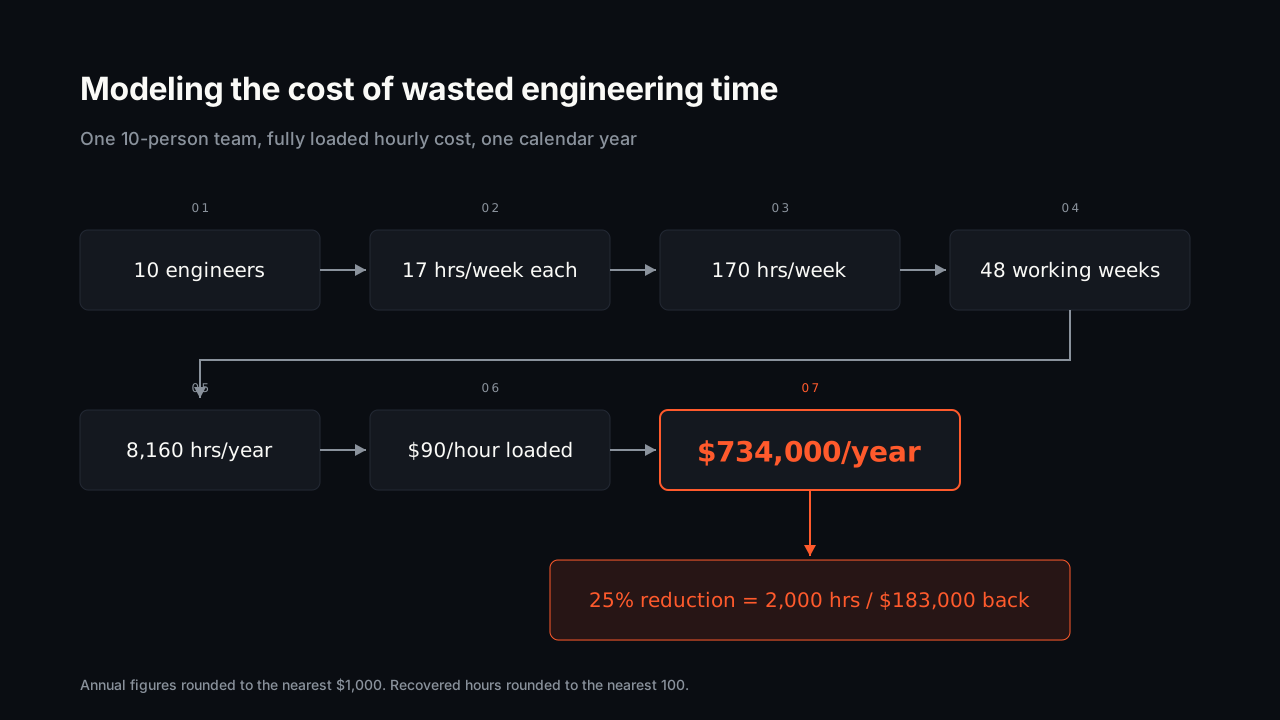
Suppose a 10-engineer team at the reported 17 hours per week of AI-related debugging. That is 170 hours a week, and across 48 working weeks it comes to roughly 8,160 engineering hours per year. At a fully loaded cost of $90 an hour, you are looking at about $734,000 in annual spend on cleaning up after your tools.
You will not drive that to zero. But a 25% reduction on that line is roughly 2,000 hours and $183,000 back, which is more than most teams spend on their entire AI tooling budget. The leverage is on the input side, not the model side.
From token waste to budget line item
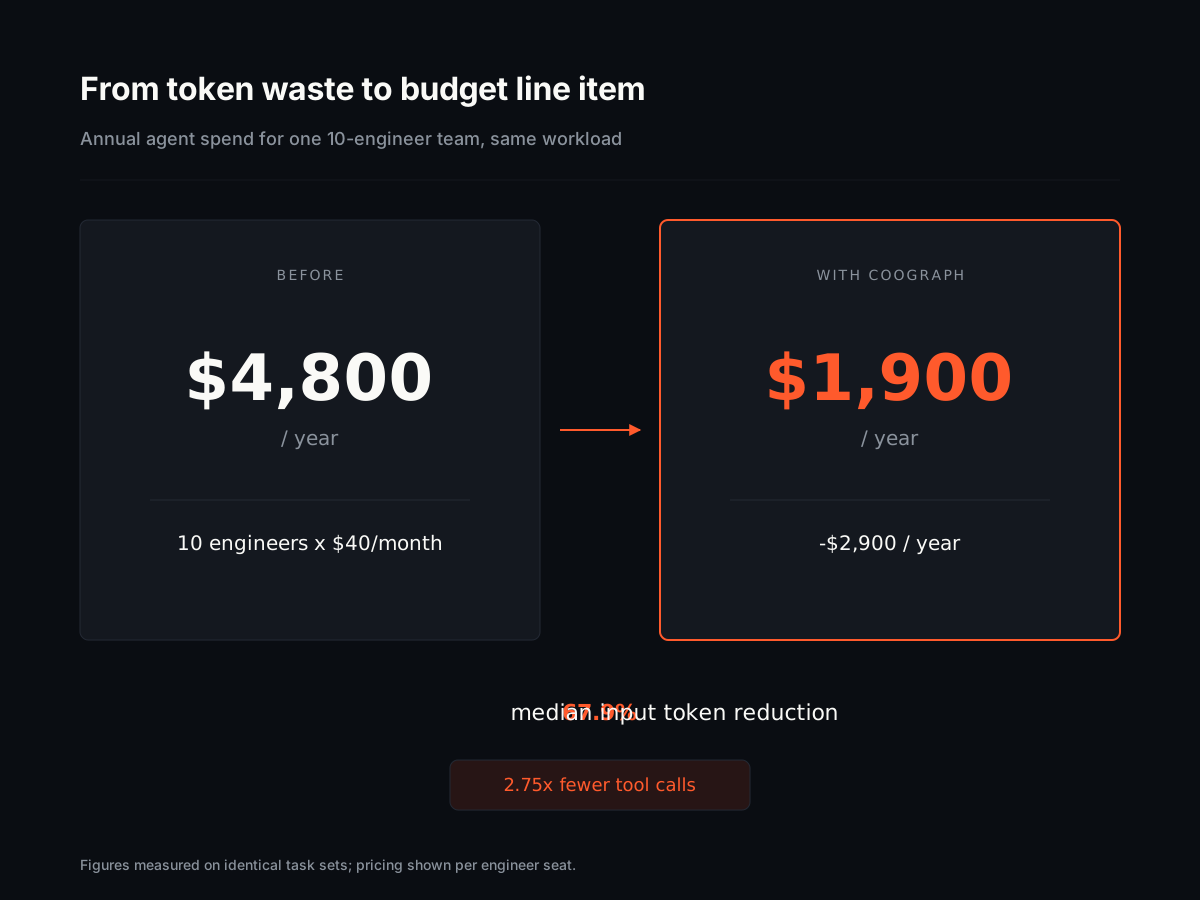
On our committed, reproducible benchmark, Coograph cuts input tokens by a median of 67.9% by feeding the agent only the files a task actually depends on. The benchmark is pinned to specific commits so you can rerun it rather than take the claim on faith.
Run the arithmetic on your own bill. If you are paying $40 per engineer per month in agent API spend across 10 engineers, cutting input tokens by two-thirds moves that from $4,800 a year toward $1,900. The token savings are real but secondary; the main prize is that a tighter prompt produces code the reviewer does not have to untangle.
Build vs. Buy: The Case for a Ready-Made Code Graph
The engineering cost of building your own context engine
Teams try this. The first version is a grep wrapper and takes a week. The second version needs real import resolution across TypeScript path aliases, Python relative imports, and whatever your monorepo does with workspaces, and that is where the project quietly becomes a year of someone’s life.
Doing it properly means parsers per language, incremental re-indexing on every commit, and handling the ten percent of resolution cases that break every naive implementation. That is specialist compiler work. If code intelligence is not your product, you are funding infrastructure that a competitor gets for free.
Why an open-source dependency graph is the right starting point
A code graph built on SQLite gives you the useful 90% on day one, with no service to operate and no vector store to keep warm. It indexes your repo, stores the dependency edges, and answers “what does this file actually touch” in milliseconds.
Open source matters here for a boring reason: you can read how resolution works and fix the edge case your stack hits. You get the benefit without owning the roadmap.
How a Dependency Graph Makes Every Agent More Efficient
Precision context for your existing tools
Coograph is not another coding agent competing for a seat in your editor. It sits underneath the agents you already pay for, including Claude Code, VS Code Copilot, and Aider, and answers the retrieval question before the model ever sees a prompt.
Ask for a change to the billing handler and the graph returns the handler, its direct dependencies, and the interfaces it implements. Not the 40 grep matches. Not the test fixtures from 2023.
Fewer tool calls, faster results
Our benchmark shows a 2.75x median reduction in tool calls per task. Each avoided call is a round trip you do not pay for and a second your engineer does not spend watching a spinner.
The compounding effect matters more than the raw number. An agent that finds the right four files on the first attempt writes code against the right abstractions, which means the pull request is smaller, the review is faster, and the 17-hour debug week starts shrinking.
Why not just use an AI model with a larger context window?
A bigger window usually means a bigger bill, not a better answer. Stuffing more irrelevant files into a prompt raises cost per turn and can still mislead the model when it encounters two plausible versions of the same code. The goal is relevant context, not more context.
Does Coograph replace my current AI coding assistant?
No, it feeds it. Coograph works alongside tools like VS Code Copilot, Claude Code, and Aider by handing them a precise, minimal file set for each task. Your team keeps the tools they already know, with lower token spend and fewer wrong-file errors.
How much can I realistically save on AI spend?
Our committed benchmark shows a median 67.9% reduction in input tokens and a 2.75x drop in tool calls. Your results depend on repo size and task type, but context bloat is the cheapest inefficiency to remove in most AI tooling budgets.
Is a code graph only for large enterprise teams?
No. A 10-person team feels wasted engineering hours more sharply than a 500-person one, because there is no slack to absorb them. The open-source core runs on a laptop against a single repo.
How long does it take to see whether this works?
Index your largest repo and run the same three tasks through your agent with and without the graph, comparing token counts. That is an afternoon of work and gives you a number specific to your codebase rather than ours.
Start by indexing one repo and measuring the token delta on a handful of real tasks before you change anything else — the getting started docs take about ten minutes, and if the numbers hold up for your team, Coograph Pro adds the hosted indexing and multi-repo support that make it practical across an org.
Cut your AI coding bill 67–78%. Coograph is MIT-licensed and free forever. Pro is bespoke services.