Copilot Goes Pay-Per-Token on June 1. Your Context Bloat Is Now a Line Item.
GitHub Copilot switches every paid plan to usage-based AI Credits on 1 June 2026. Token waste that was hidden inside a flat $10/month bill now eats your credit balance in real time. Here's the math, and how a code-graph cuts it by ~80%.
On 1 June 2026, GitHub flips a switch that quietly rewires the economics of AI-assisted coding for everyone on a Copilot plan. The Premium Request Unit (PRU) system goes away. In its place: GitHub AI Credits, a usage-based meter where every chat turn, every Copilot Chat tool call, every agent-mode step, and every code-review run is priced in tokens against your monthly credit balance.
“Copilot Pro: $10/month, including $10 in monthly AI Credits.” — GitHub Copilot is moving to usage-based billing
The headline subscription numbers don’t move. The math underneath them does. And the math is unforgiving to anyone whose AI assistant is dragging an extra 100,000 tokens of irrelevant code into every reply.
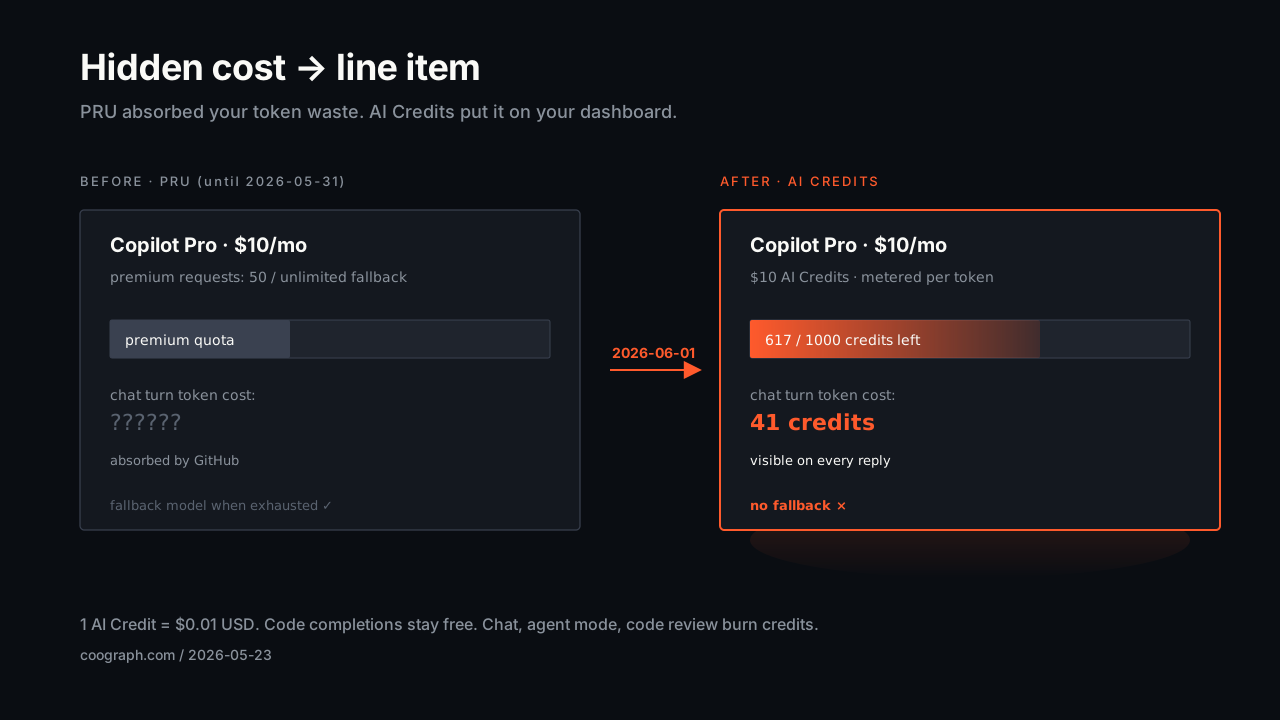
What actually changes on 1 June
Five things, in plain English:
- Usage is metered in tokens, not requests. Input, output, and cached tokens are all counted. Each model has its own per-million-token rate.
- 1 AI Credit = $0.01 USD. Your subscription includes a fixed credit allotment (Pro: $10, Pro+: $39, Business: $19, Enterprise: $39 per user per month).
- Code completions and Next Edit suggestions stay free and do not consume credits. That’s the inline ghost-text and tab-to-accept flow you know from your editor.
- Everything else burns credits. Chat, agent mode, multi-file edits, slash commands that call the model, Copilot Code Review (which also consumes GitHub Actions minutes), and any “ask the assistant” interaction.
- No more silent fallback to cheaper models when you run out. PRU’s safety net is gone. Exhaust the credits and you either stop, top up, or get throttled by your admin’s budget policy.
The official rate card lives in the models & pricing reference. Sample rates per 1M tokens (subject to change):
| Model | Input | Cached | Output |
|---|---|---|---|
| GPT-5 mini (lightweight) | $0.25 | $0.025 | $2.00 |
| GPT-5.4 (versatile) | $2.50 | $0.25 | $15.00 |
| Claude Sonnet 4.5 (versatile) | $3.00 | $0.30 | $15.00 |
| Gemini 3.5 Flash (lightweight) | $1.50 | $0.15 | $9.00 |
If you’ve worked with the raw Anthropic, OpenAI, or Google APIs, this table is familiar. The novelty is that a regular Copilot Pro user is now staring at API-style economics for the first time.
What was previously hidden is now a number on your dashboard
Under PRU, you got a fuzzy sense that “premium chats were limited” and a slow trickle of throttling messages. The token cost of any specific interaction was invisible to you. GitHub absorbed the variance.
Starting 1 June, your dashboard shows AI Credits remaining. A single conversation with a fat context window can drop that number measurably. A long agent-mode run with sloppy file retrieval can drain a meaningful share of your monthly $10 in a single afternoon.
This is the moment that the cost of context bloat stops being a back-office concern at the vendor and starts being your problem.
We wrote about context bloat in a prior post on AI tool budgets, aimed at teams running self-hosted agents against the Anthropic and OpenAI APIs directly. Everything we said there now applies, with one tweak: it also applies to your individual developers on a $10 Copilot Pro plan. The economics propagated downstream.
A worked example: one chat turn, two context strategies
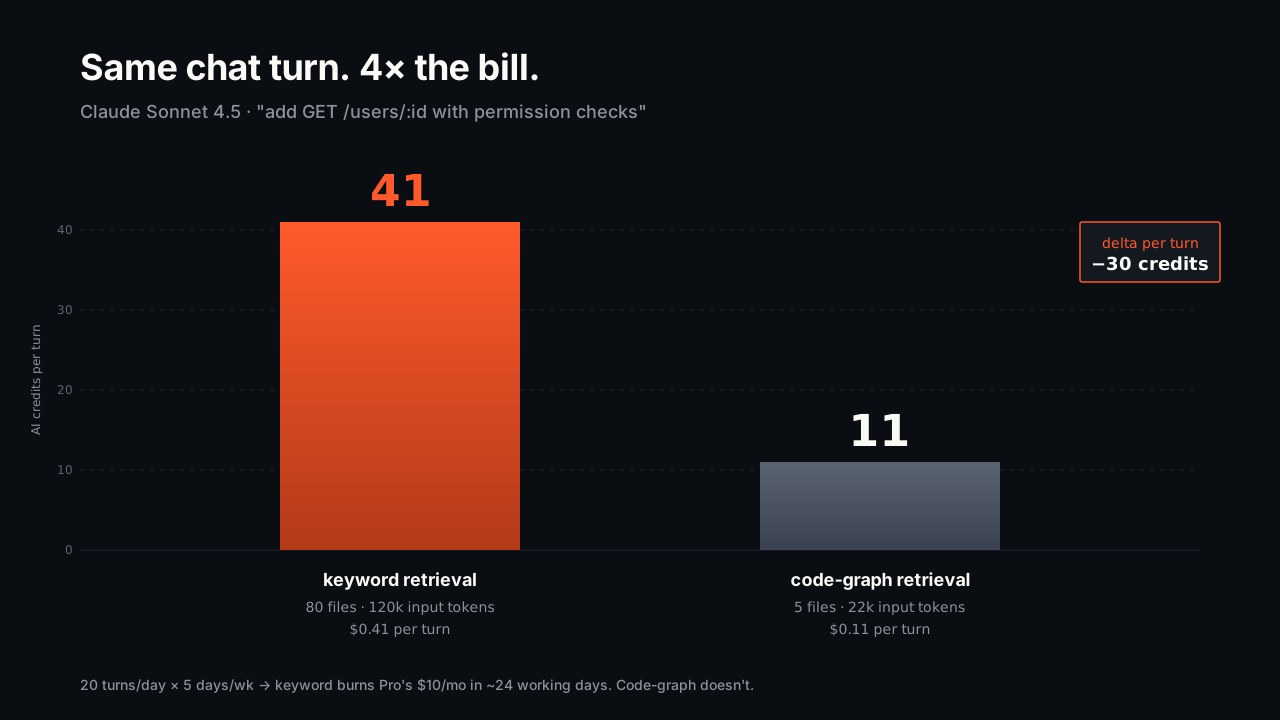
Let’s price the same chat turn under two retrieval strategies. The task: “Add a new GET endpoint for users by ID, with permission checks.” Model: Claude Sonnet 4.5. Rates from the table above.
Strategy A — keyword / vector retrieval (the default in most editors today). The assistant pulls 80 files mentioning “user”, “endpoint”, “permission”, or “route”. Total input: ~120,000 tokens. Output: ~3,000 tokens. Cached: ~20,000 tokens reused from earlier in the session.
- Input: 120k × $3.00 / 1M = $0.36
- Cached: 20k × $0.30 / 1M = $0.006
- Output: 3k × $15.00 / 1M = $0.045
- Total: ~$0.41 = 41 AI Credits
Strategy B — code-graph retrieval. The assistant queries a precomputed dependency graph, gets back exactly 5 files (the user model, the routes file, the permission middleware, one test, the types file). Total input: ~22,000 tokens. Output: ~3,000 tokens. Cached: ~6,000 tokens.
- Input: 22k × $3.00 / 1M = $0.066
- Cached: 6k × $0.30 / 1M = $0.0018
- Output: 3k × $15.00 / 1M = $0.045
- Total: ~$0.11 = 11 AI Credits
Per turn: 30 AI Credits saved. Sounds tiny. Now do it twenty times a day, five days a week. Strategy A burns through your entire $10 Pro allotment in ~24 working days. Strategy B fits comfortably under it with credits to spare. The delta over a year, at the Pro tier alone, is the difference between “subscription stays at $120” and “subscription plus overage hits $400–$500” for the exact same work.
For a 10-person team on Business ($19/seat = $19 credits/seat), the calculus is starker. Strategy A blows past the allotment in the second week of the month. Strategy B doesn’t.
Why the “no fallback model” change hurts most
Under PRU, if you maxed out premium requests Copilot quietly downshifted to a cheaper model. Annoying, but you kept working.
Under AI Credits, that downshift is gone. The exact wording from the announcement:
“Fallback experiences eliminated — users no longer drop to cheaper models when exhausted; instead governed by available credits and admin budget controls.”
When your credits are out, you either:
- Stop using paid features until next month.
- Pay overage on a corporate card.
- Wait for your admin to top up the cost-center budget — which, on Business and Enterprise tiers, is a new shared pool that any teammate’s runaway chat can drain.
This is why context bloat is now operationally dangerous, not just expensive. A noisy session can lock a teammate out of agent mode for the rest of the month. Treating per-turn token cost as something to optimize for is no longer a finance-team exercise. It’s a “can my colleague ship today” exercise.
How a code-graph eliminates most of the waste
The fix isn’t a smarter prompt, a different model, or a better RAG vendor. It’s giving the assistant a precise answer to the question every retrieval system gets wrong: which files actually matter for this task?
A code-graph parses your repo into a small SQLite database of nodes (files, classes, functions, methods) and edges (imports, calls, definitions). When the agent picks up a ticket, the first tool call returns the 4–6 files that matter for that change — derived from the import and call structure of your own code, not from word-matching or embedding similarity. The rest never enters the context window. The token bill drops with it.
Coograph ships exactly this:
- Open-source, MIT, runs locally. Build the graph in seconds. No code leaves your machine.
- One MCP server, every supported agent. Claude Code, VS Code Copilot, Codex CLI, OpenCode, Cursor, Windsurf, Aider, and Cline can all query it. Copilot Chat picks it up the same way it picks up any MCP server.
get_minimal_context(task)returns 4–6 files instead of 200. Agents fall back to grep only when the graph genuinely has no answer.- Auto-updated. Git hooks reparse only files whose SHA-1 changed. Millisecond updates after every commit.
You don’t change your editor. You don’t change your model. You don’t change your workflow. You change the first tool call the agent makes when it sees a new task — from “grep the world” to “ask the graph”. Everything downstream of that gets cheaper.
What to do this week, before 1 June
Five concrete moves, ranked by how much they affect your June credit bill:
- Audit which of your sessions use chat vs. completions. Completions stay free. Chat doesn’t. If half your “Copilot use” is actually inline ghost text, you’re fine — that part of your bill is zero. If most of it is chat or agent mode, keep reading.
- Turn on the preview bill experience GitHub shipped in May. It projects your June cost from your current May behavior. If the number scares you, you have one week to do something about it.
- Install a code-graph in front of your chat agent. Coograph takes about two minutes to set up — see getting started. Most users see chat token usage drop 60–80% on the first task.
- Stop letting the agent grep blindly. If your team’s Copilot Chat workflows start with “find every file that mentions X,” that’s the line item. Replace it with
get_minimal_context(task)or the equivalent in your tool. - Set a budget cap on the cost center. Business and Enterprise admins should set this before 1 June. Treat it like an AWS budget alarm, not a yearly procurement event.
What this looks like a year from now
Usage-based billing for AI assistants will normalize the way usage-based billing normalized cloud compute. The first six months will be messy. Teams will get surprise invoices, blame the vendor, blame the assistant, and eventually blame the workflow. Then they’ll start measuring tokens per task, the same way they measure CPU per request.
The teams that win this transition are the ones who get serious about what enters the context window, treat it as the cost of goods sold, and instrument it accordingly. The teams that don’t will spend the next year either paying overage or watching their developers wait for next-month credits.
The good news: the fix is small, local, open-source, and ready today. The bad news: it’s the kind of small fix that’s easy to defer until you’ve already spent the month’s budget.
I only use Copilot’s inline completions — does this affect me?
Not directly. Code completions and Next Edit suggestions remain free under usage-based billing. If you never touch Copilot Chat, agent mode, or Copilot Code Review, your subscription cost stays exactly the same. The change matters the moment you start a chat conversation.
Will Coograph reduce my completion-only usage too?
Completions are free, so there’s no token saving to capture there. Coograph’s value shows up in chat and agent flows — the parts of Copilot that are about to become metered. The bigger your chat usage, the bigger the savings.
Can I use a code-graph with Copilot Chat in VS Code?
Yes. Copilot Chat supports MCP servers, and Coograph ships a standalone MCP server. The agent calls get_minimal_context before reading files, the same way it would on Claude Code or Codex CLI. See the code-graph docs.
What about teams on annual Copilot plans?
Per GitHub: annual plan holders retain PRU pricing until their term expires, then transition to usage-based billing on renewal. The savings argument still applies — the only difference is your timer started in June or starts when your annual term ends.
How does Coograph compare to RAG or embedding-based retrieval?
Embeddings rank by surface similarity; a code-graph ranks by actual structural dependence. The two answer different questions. “What text looks like this prompt” is useful for docs search; “what code is reachable from this function” is what you want before editing a function. We covered the difference in the context bloat post.
Is there a risk to running an MCP server locally?
The Coograph MCP server is open source, runs locally, has no network calls, and reads from a SQLite file in your repo. We’ve also written about agent shell auditing in the per-session audit log post — if you want to know exactly what every agent ran, that pattern stacks cleanly on top of the code-graph.
If your team is running Copilot Chat or agent mode and you haven’t priced the token cost per task, do it before 1 June. Then try Coograph — about two minutes to install — and re-price the same tasks. If the savings don’t land, you’ve lost an afternoon. If they do, you’ve bought back your monthly credit allotment for the rest of the year.
Further reading: the original context bloat post · the Coograph code-graph docs · GitHub’s announcement · GitHub’s models & pricing reference.
Cut your AI coding bill 30–80%. Coograph is MIT-licensed and free forever. Pro is bespoke services.